Skip to content

Generate 2K 9:16 soft new Chinese zen aesthetic exploration drafts for mobile wallpapers and vertical social media covers

Soft Zen New Chinese Aesthetic 2K Vertical Wallpaper Drafts

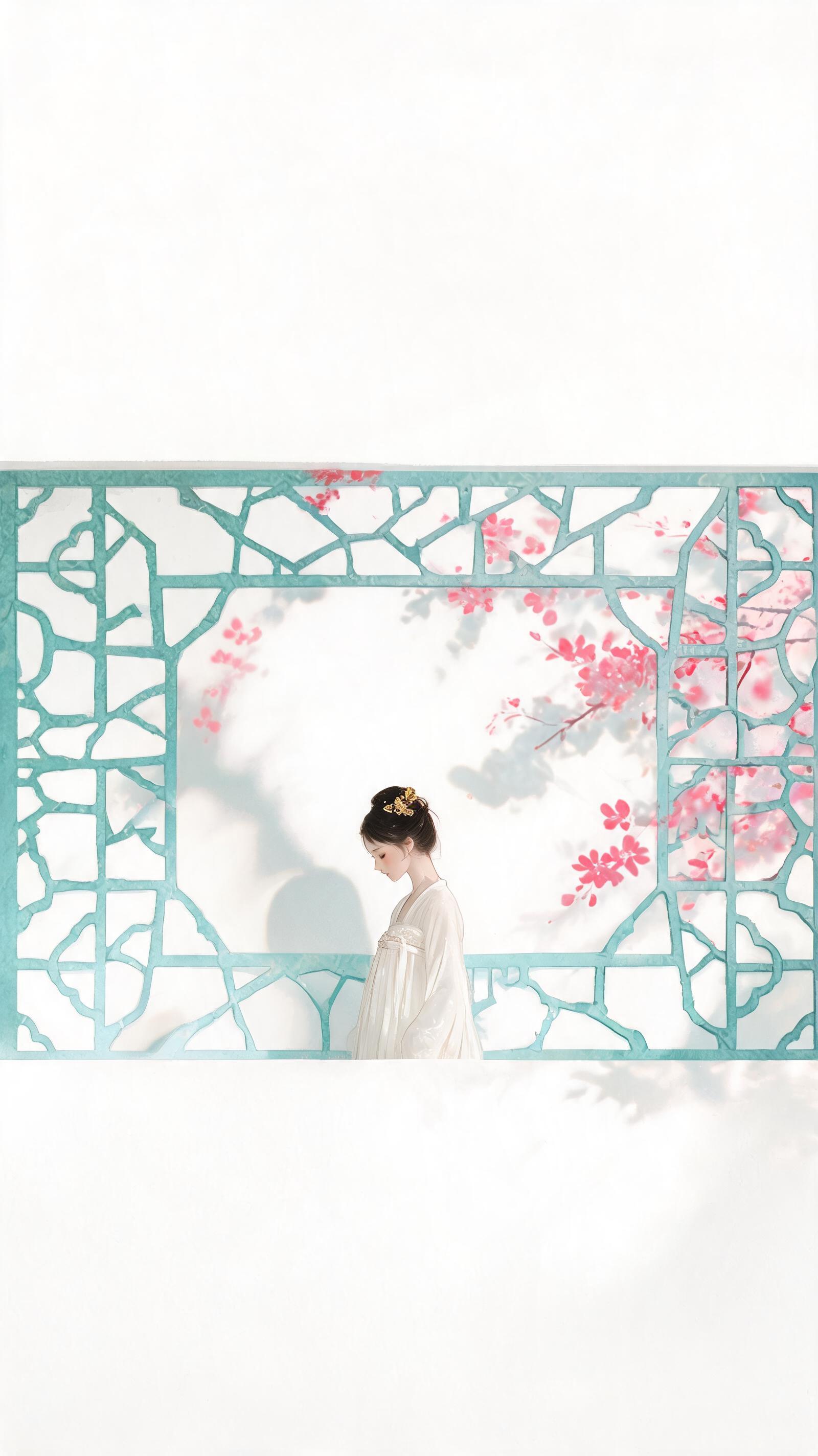
This workflow creates exploration draft visual assets that follow a restrained new Chinese aesthetic, centered on a quiet, demure ancient-style woman positioned in the lower middle of the frame, with a jade cyan lattice flower window as the primary background element.

Asset
Exploration draft illustrative visual asset
Format
Model default · 2K
Model
Doubao Seedream 5.0 Lite

8 credits per image

Your references, identity direction, and approved creative context stay reusable inside the Project.

Sample generatedGenerated with · Doubao Seedream 5.0 LiteUpdated · Jul 29, 2026
Soft Zen New Chinese Aesthetic 2K Vertical Wallpaper Drafts generated example 1
2K · Model default
OUTPUT 01 / 02

REVIEW REQUIRED
Aspect Ratio Compliance · Color Palette Adherence

Generated output

Inspect the result before you put it to work.

Check the main subject, framing, material detail, and channel requirements at full size before handoff.

Soft Zen New Chinese Aesthetic 2K Vertical Wallpaper Drafts generated example 1
Generated result · inspect at full size before handoff

What this recipe creates

A repeatable exploration draft illustrative visual asset workflow.

Deep magenta floral shadows cast across the scene, tiny pale gold accent details, and generous empty negative space at the top and side edges of the frame support use as mobile lock screen art or vertical social media cover imagery. The color palette sticks to warm off-white base tones, limited targeted use of magenta for floral highlights, and no over-saturation of any single hue across the full frame. All outputs are 2K resolution at 9:16 aspect ratio.

  • 2K 9:16 exploration draft of the zen new Chinese wallpaper scene
  • Color-corrected draft with no over-saturation of single hues
  • Lightly textured paper-effect flat poster style visual
  • Feminine aesthetic vertical social media cover draft
Mobile lock screen wallpaper assetsVertical social media post coversDigital stationery background elements

Required inputs

  1. Specified 9:16 2K output resolution setting
  2. Core scene description of robed woman by jade flower window
  3. Color palette restriction rules for magenta, jade cyan and pale gold accents
  4. Negative space placement guide for top and side frame areas

How it works

Review the workflow before you create.

4

Use each step as a review gate. If one gate fails, change that input before spending another generation.

01 / STEP

Lock Aspect Ratio and Base Resolution First

Start by setting your output canvas to 9:16 aspect ratio and 2K total resolution before adding any scene details to avoid stretched or cropped final outputs.

Quality check · Confirm the canvas dimensions display no non-standard edge cropping before you submit the generation request.
02 / STEP

Apply Color Palette Restriction Rules

Input explicit limits for each color’s use case, specifying that magenta only appears on floral shadows, jade cyan only on the flower window structure, and pale gold only on small accent details.

Quality check · Review the first pass draft to confirm no single color covers more than 30% of the total frame area.
03 / STEP

Adjust Negative Space Placement

Add explicit instructions to position the human figure in the lower middle of the frame, and reserve 40% of the total frame area for empty negative space at the top and side edges.

Quality check · Verify that no key visual elements extend into the top 25% of the frame, leaving clear empty space for text overlays if needed.
04 / STEP

Tune Lighting and Texture Settings

Set lighting to soft diffused natural daylight, and add a subtle matte paper texture effect to avoid harsh glossy highlights across the scene.

Quality check · Confirm no areas of the frame are unnaturally darkened, and the overall look matches a clean flat poster aesthetic.

Recommended model and tested settings

Tested setup and quality gates.

Model
Doubao Seedream 5.0 Lite · doubao-seedream-5-0-lite-260128
Style
All outputs from this workflow are exploration drafts, not final production assets. Minor inconsistencies in character details or floral shadow placement may appear across separate generation runs.
Resolution
2K
Guidance
This workflow is calibrated specifically for the listed model version, and may produce unexpected results if run on other untested image generation models.
Tested
Jul 29, 2026

Quality checklist

Aspect Ratio ComplianceFinal output is exactly 9:16 at 2K resolution with no stretched or distorted edge elements.
Color Palette AdherenceWarm off-white base is dominant, magenta is limited only to floral shadow details, and no single hue covers more than 30% of the frame.
Composition AlignmentHuman figure sits in the lower middle of the frame, with at least 35% of total frame area reserved as empty negative space.
Lighting ConsistencyNo over-darkened areas, soft diffused natural light across the full scene, no harsh blown-out highlights.
Texture MatchSubtle matte paper texture is visible, with a clean flat poster aesthetic that avoids overly rendered 3D details.

Common failure modes

Know what to correct before the next run.

FAILURE / 01

Generated output has a 1:1 aspect ratio instead of 9:16

Navigate to the canvas settings panel, explicitly select 9:16 aspect ratio, and re-run the generation without modifying any other prompt details.

FAILURE / 02

Magenta floral shadows cover more than half of the full frame

Move the color limit rules to the first line of your prompt text, explicitly state that magenta may only appear on floral shadow elements, and re-submit the request.

FAILURE / 03

Human figure is positioned in the exact center of the frame with no top negative space

Add a line specifying that the top 40% of the frame must be completely empty, and re-run the generation to adjust element positioning.

FAILURE / 04

Output has harsh glossy lighting and no subtle paper texture

Adjust the lighting setting to soft overcast natural daylight, add a note for subtle matte paper texture, and re-generate the asset.

FAQ

Production notes.

No, these 2K exploration drafts are optimized for mobile screen and small digital use cases, and do not have sufficient resolution for large format print deployment.

No, this workflow generates single frame illustrative art only, and does not produce consistent multi-view character assets, so identity drift may occur if you attempt to generate additional views of the same character.

This happens when the color restriction rules are not explicitly prioritized in your prompt, you can re-submit the request with the color usage limits placed at the start of your prompt text to fix this.

Yes, the reserved negative space at the top and side edges of the 9:16 frame is designed to accommodate short text overlays for social media cover use cases.