Skip to content

Generate clean, photorealistic studio product shots for e-commerce and advertising use with minimal required post-processing

Seamless White Background Studio Product Photo Workflow

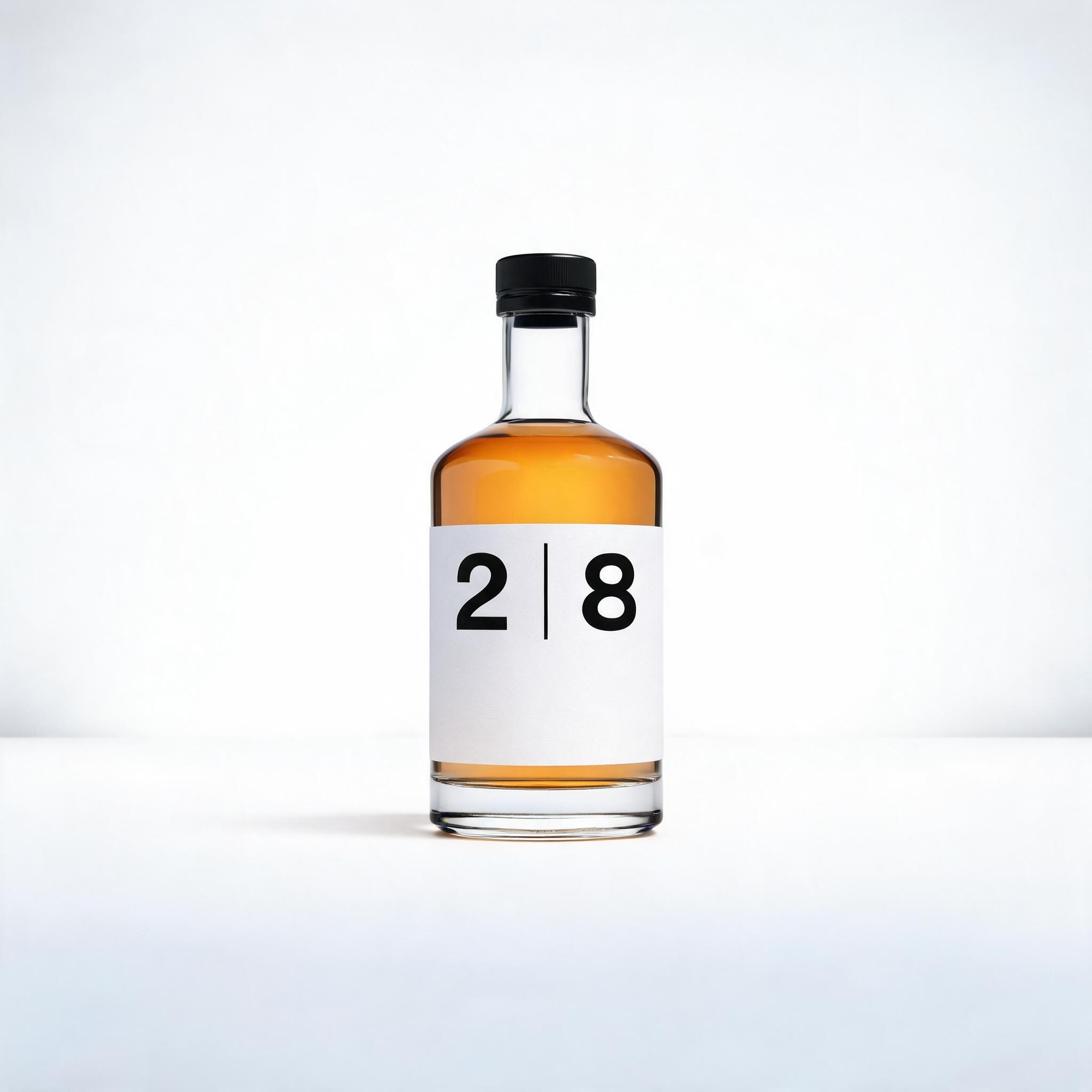
This workflow outputs 2K resolution photorealistic studio product photos set on a flawless seamless white infinity background, with balanced lighting and subtle natural drop shadows to add depth without distraction.

Asset
2K seamless white background studio product photograph
Format
Model default · 2K
Model
Doubao Seedream 5.0 Lite

8 credits per image

Your references, identity direction, and approved creative context stay reusable inside the Project.

Sample generatedGenerated with · Doubao Seedream 5.0 LiteUpdated · Jul 29, 2026
Seamless White Background Studio Product Photo Workflow generated example 1
2K · Model default
OUTPUT 01 / 02

REVIEW REQUIRED
Seamless background · Product surface condition

Generated output

Inspect the result before you put it to work.

Check the main subject, framing, material detail, and channel requirements at full size before handoff.

Seamless White Background Studio Product Photo Workflow generated example 1
Generated result · inspect at full size before handoff

What this recipe creates

A repeatable 2k seamless white background studio product photograph workflow.

All generated drafts are exploration assets that require minor post-processing checks, with no added dust, fingerprints, or surface blemishes on the target product to cut down retouch time.

  • 2K resolution seamless white background product image
  • Soft natural drop shadow under the product base
  • Accurate product material texture detail
  • True-to-life product color representation
  • Crisp full-frame sharpness across the product

E-commerce catalog product listingsPrint magazine product advert layoutsSocial media product launch assets

Required inputs

  1. Exact product name and full product feature description
  2. Specified camera type for the shoot
  3. Specified lens type for the shoot
  4. Desired product color profile reference

How it works

Review the workflow before you create.

4

Use each step as a review gate. If one gate fails, change that input before spending another generation.

01 / STEP

Input your core product details first

Start by defining the exact product you want to render, including all visible material properties and shape details to avoid unexpected design changes.

Quality check · Confirm the generated draft matches 100% of your listed product features with no added or missing components.
02 / STEP

Set your lighting parameters explicitly

Specify soft diffused key light and balanced fill light values to avoid harsh glares or overexposed areas on reflective product surfaces.

Quality check · Check that no part of the product is blown out to pure white, and subtle surface reflections are visible.
03 / STEP

Add camera and lens specifications

Input your selected camera body and lens type to match the focal length and depth of field you would use for in-studio product shoots.

Quality check · Verify focus is consistent across the entire product with no blurry edges or out of focus sections.
04 / STEP

Adjust shadow placement rules

Add a note to place the soft shadow directly under the product base to avoid disconnected or overly dark shadows that distract from the item.

Quality check · Confirm the shadow sits flush with the product base and fades smoothly into the white background.

Recommended model and tested settings

Tested setup and quality gates.

Model
Doubao Seedream 5.0 Lite · doubao-seedream-5-0-lite-260128
Style
This workflow is calibrated for the listed model version. Outputs may vary if used with untested older or newer model iterations.
Resolution
2K
Guidance
Works best for single, centered static product assets. Not optimized for complex multi-object scenes or dynamic action product shots.
Tested
Jul 29, 2026

Quality checklist

Seamless backgroundNo visible seams, gradients, or stray objects on the white infinity background surrounding the product.
Product surface conditionNo visible dust, fingerprints, scratches, or unrelated blemishes on the product exterior.
Shadow placementSoft, low-contrast shadow sits directly under the product base with no hard edges or disconnected positioning.
Color accuracyProduct colors match the specified reference values with no unexpected hue shifts or oversaturated sections.
Edge sharpnessAll product edges are crisp and well-defined with no soft blurring or aliasing artifacts.

Common failure modes

Know what to correct before the next run.

FAILURE / 01

Product floats above the white background with no visible shadow

Add explicit text that the soft shadow must be rendered directly touching the bottom edge of the product, then re-run generation.

FAILURE / 02

Unwanted dust or smudges appear on the product surface

Add a line that the product is 100% pristine with no marks of any kind, then generate a new draft.

FAILURE / 03

Product edges are blurry and out of focus

Update your lens specification to a f/8 or higher aperture value to get full product sharpness.

FAILURE / 04

White background has faint gray gradients or stray marks

Add the phrase "100% pure flat seamless white background with zero gradients" to your prompt, then re-submit.

FAQ

Production notes.

This workflow outputs verified 2K resolution imagery. Any higher resolution claims referenced in generation prompts are draft visual intent, not guaranteed output size.

Minor post-processing adjustments for color calibration or shadow refinement may be needed, as all outputs are exploration drafts not final production specifications.

This workflow is optimized for single centered front-facing product shots. Generating multiple angles in one prompt may lead to inconsistent product proportions or distorted details.

Adjust your lighting prompt to specify matte diffused reflection limits, and re-run the generation to remove unintended harsh specular highlights.