Skip to content

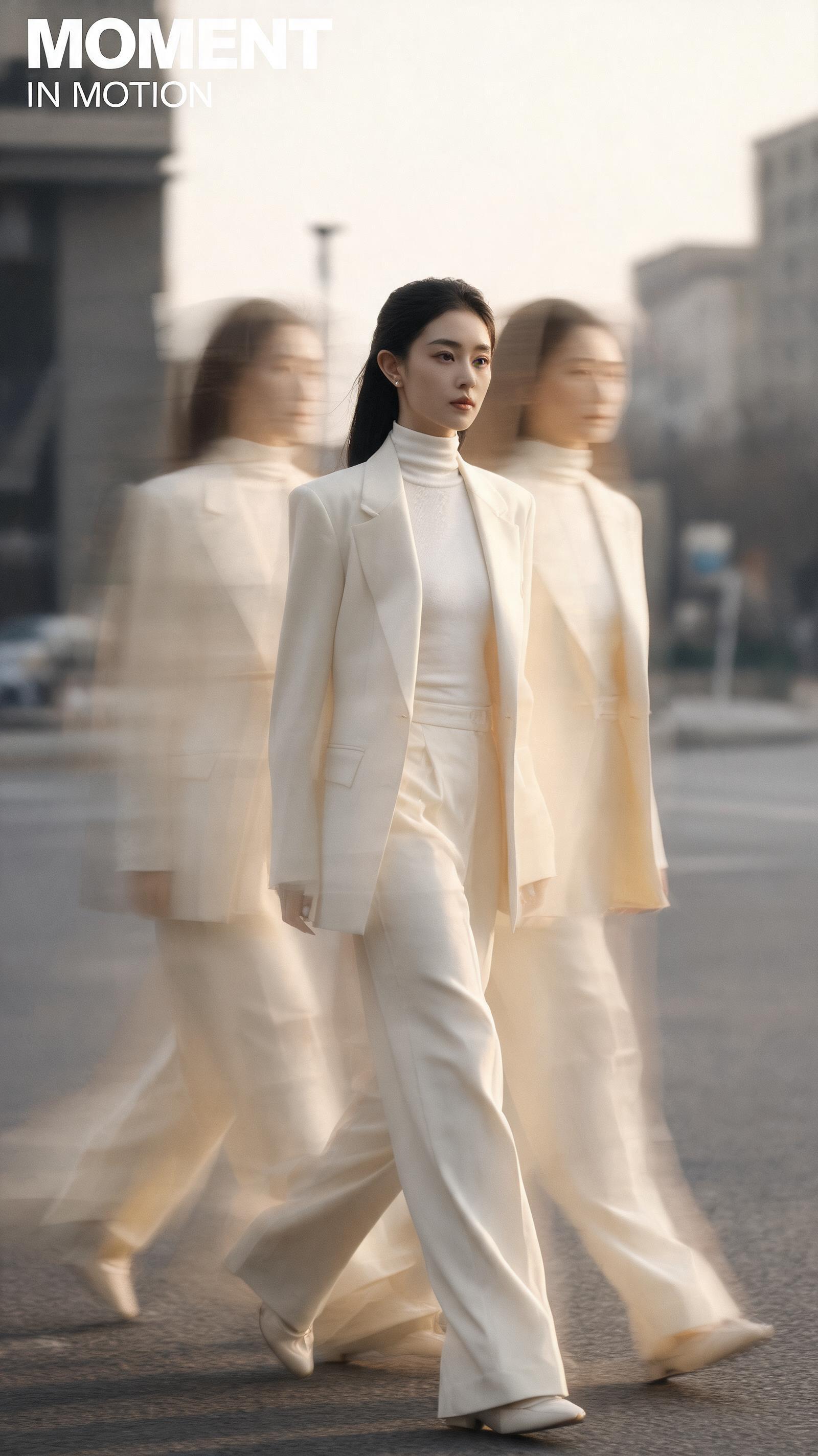
Generate 2K 9:16 vertical slow-shutter fashion editorial posters with authentic long-exposure motion blur and integrated minimal typography

2K 9:16 Slow Shutter Fashion Editorial Poster Workflow

This workflow outputs 2K resolution 9:16 vertical fashion editorial posters that mimic analog slow-shutter photography, with intentional motion blur, soft film grain, and unobtrusive modern typography.

Asset
9:16 2K experimental fashion editorial poster
Format
Model default · 2K
Model
Doubao Seedream 5.0 Lite

8 credits per image

Your references, identity direction, and approved creative context stay reusable inside the Project.

Sample generatedGenerated with · Doubao Seedream 5.0 LiteUpdated · Jul 29, 2026
2K 9:16 Slow Shutter Fashion Editorial Poster Workflow generated example 1
2K · Model default
OUTPUT 01 / 02

REVIEW REQUIRED
Single clear visual anchor · Natural motion blur

Generated output

Inspect the result before you put it to work.

Check the main subject, framing, material detail, and channel requirements at full size before handoff.

2K 9:16 Slow Shutter Fashion Editorial Poster Workflow generated example 1
Generated result · inspect at full size before handoff

What this recipe creates

A repeatable 9:16 2k experimental fashion editorial poster workflow.

This process is built for creating understated, cinematic fashion editorial assets that avoid overproduced digital effects, prioritizing natural motion trails, generous negative space, and readable, uncluttered text placement.

  • 2K 9:16 vertical fashion editorial image
  • Natural slow-shutter motion blur effect
  • Integrated minimal sans-serif typography
  • Subtle film grain and low-saturation color grade
  • Uncluttered negative space layout
Vertical Instagram and TikTok fashion contentIndependent magazine spread assetsSmall brand seasonal lookbook pages

Required inputs

  1. Selected subject appearance and gender
  2. Curated fashion styling reference
  3. Chosen background environment (street / minimalist studio / interior)
  4. Defined muted color palette

How it works

Review the workflow before you create.

4

Use each step as a review gate. If one gate fails, change that input before spending another generation.

01 / STEP

Lock the sharp visual anchor before adding motion parameters

Start by defining your core subject as the only fully sharp element in the frame, then apply motion effects exclusively to surrounding areas and moving parts of the outfit to avoid distorting facial features or key styling details.

Quality check · The core subject’s face and primary outfit details are 100% recognizable, no unwanted blur appears on the anchor element.
02 / STEP

Restrict color palette to 3 muted base tones

Input no more than 3 low-saturation base colors for the full scene, to avoid clashing hues that break the understated editorial aesthetic.

Quality check · No bright, unplanned saturated colors appear anywhere in the frame, all tones align with the chosen palette.
03 / STEP

Place typography in empty negative space only

Specify that all text elements are positioned in unobstructed background areas, not overlapping the sharp core subject or prominent motion trails.

Quality check · Main title and subtitle are fully legible, no text overlaps the primary subject or key motion details.
04 / STEP

Tune motion intensity to avoid over-blurring

Adjust motion effect strength to keep trails soft and translucent, not opaque or heavily distorted, to match analog long-exposure results.

Quality check · Motion trails look like captured camera movement, not added digital filter effects.

Recommended model and tested settings

Tested setup and quality gates.

Model
Doubao Seedream 5.0 Lite · doubao-seedream-5-0-lite-260128
Style
All outputs are natively generated at 2K 9:16 resolution, no upscaling is required for standard digital use cases.
Resolution
2K
Guidance
This workflow is not optimized for 1:1 or 16:9 aspect ratios, you will see unexpected cropping if you select a non-9:16 output size.
Tested
Jul 29, 2026

Quality checklist

Single clear visual anchorExactly one core subject element remains fully sharp and recognizable, no competing sharp elements in the frame.
Natural motion blurAll motion trails, afterimages, and blur effects align with real slow-shutter camera behavior, no unnatural digital distortion.
Uncluttered typographyOnly the specified main title and short subtitle appear, no extra text, numbers, or watermarks are present.
Restrained color gradeLow saturation, subtle film grain, and soft focus are applied evenly across the full image, no harsh overexposed areas.
Generous negative spaceAt least 40% of the frame is empty clean background, no cluttered overlapping elements blocking the layout.

Common failure modes

Know what to correct before the next run.

FAILURE / 01

Core subject’s face is distorted or unrecognizable

Explicitly mark the subject’s face and headwear as the non-blur visual anchor in your input prompt.

FAILURE / 02

Generated text has misspelled characters or unreadable glyphs

Shorten the main title to under 10 characters and remove all special symbols from your text inputs.

FAILURE / 03

Motion trails are opaque and look like digital double exposure filters

Lower motion effect strength to 40% or below and add a note to make all afterimages semi-translucent.

FAILURE / 04

Frame is overcrowded with no usable negative space for text

Remove all secondary decorative objects from your scene input and specify a plain, unadorned background.

FAQ

Production notes.

No, this workflow intentionally applies soft motion blur to moving fabric and surrounding elements to replicate slow-shutter photography, so full 100% sharpness across all outfit details is not a supported output.

Keep your main title under 10 characters and your subtitle under 20 characters, and avoid special characters or custom glyphs to reduce the chance of false orthography in generated typography.

Reduce the motion intensity parameter by 20% and add a note to include subtle imperfect exposure and natural light, to move the result closer to analog long-exposure results.

No, the verified maximum output size for this workflow is 2K, which is suitable for digital distribution and small format prints, but not for large billboard or wall-sized print applications.