Skip to content

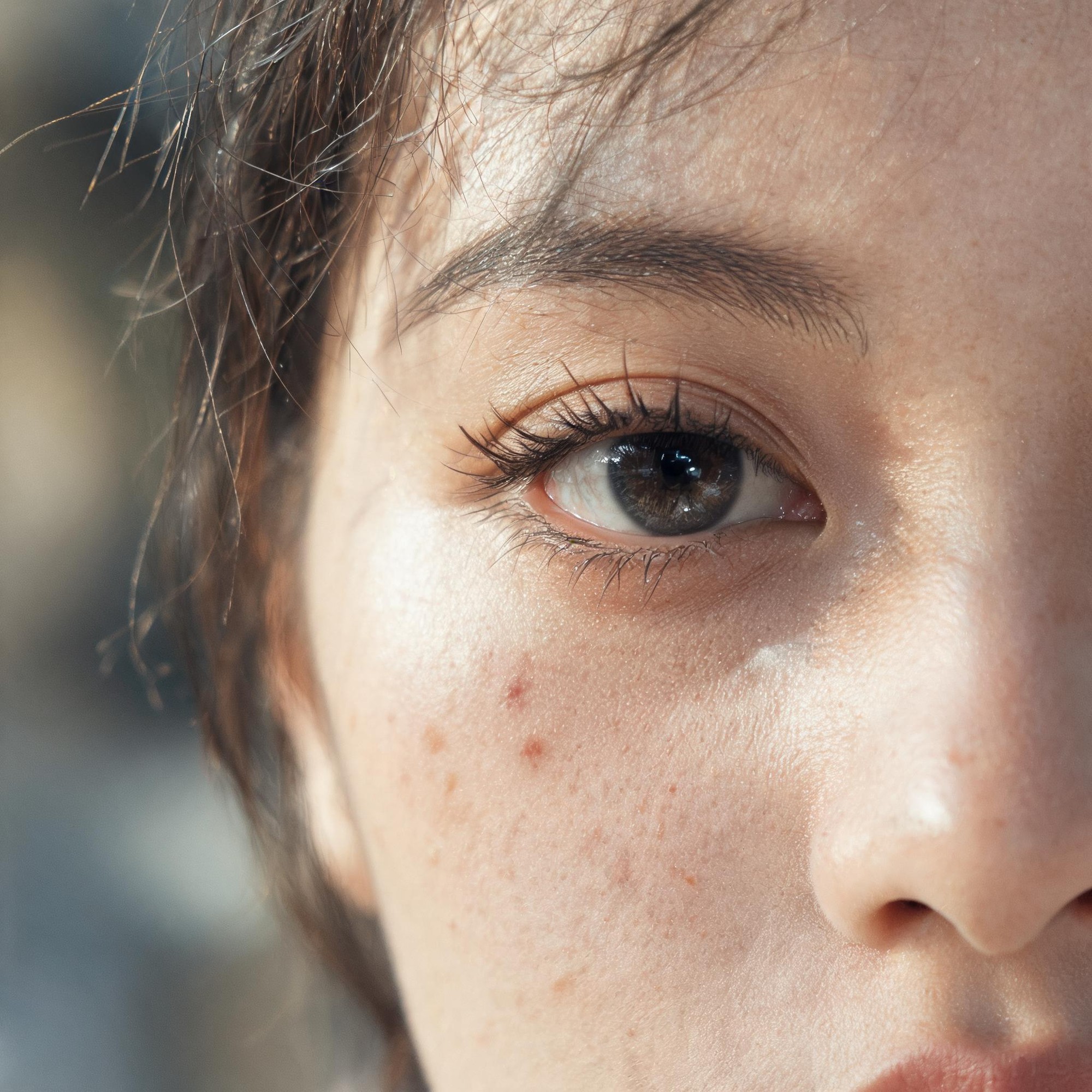
Generate unretouched hyper-realistic half-face close-up portrait drafts with fully preserved natural skin texture and no over-processed greasy or plastic skin appearance

Unretouched 2K Hyperrealistic Close-Up Facial Portrait Workflow

This workflow produces 2K resolution close-up portrait drafts that center a single eye as the focal point, retain all natural skin imperfections, and use physically consistent soft side backlighting to avoid the over-processed greasy or plastic skin look common in AI portrait outputs.

Asset
2K resolution close-up facial portrait exploration draft
Format
Model default · 2K
Model
Doubao Seedream 5.0 Lite

8 credits per image

Your references, identity direction, and approved creative context stay reusable inside the Project.

Sample generatedGenerated with · Doubao Seedream 5.0 LiteUpdated · Jul 29, 2026
Unretouched 2K Hyperrealistic Close-Up Facial Portrait Workflow generated example 1
2K · Model default
OUTPUT 01 / 02

REVIEW REQUIRED
Focal point accuracy · Natural skin detail retention

Generated output

Inspect the result before you put it to work.

Check the main subject, framing, material detail, and channel requirements at full size before handoff.

Unretouched 2K Hyperrealistic Close-Up Facial Portrait Workflow generated example 1
Generated result · inspect at full size before handoff

What this recipe creates

A repeatable 2k resolution close-up facial portrait exploration draft workflow.

Designed for creative professionals working on editorial, fine art, or documentary portrait projects, this workflow eliminates common AI portrait rendering flaws to deliver natural, lifelike close-up facial assets.

  • 2K resolution half-face close-up portrait draft
  • Single sharp focal point on one subject eye
  • Fully preserved natural skin imperfection details
  • Softly blurred solid color background
  • Physically consistent soft side backlighting
Generating raw portrait reference assetsCreating documentary-style editorial portrait draftsTesting natural skin texture rendering

Required inputs

  1. Specified subject age range (22-28)
  2. Selected subject gender identity
  3. Reference color palette for blurred background
  4. 85mm f/2 macro lens rendering parameter

How it works

Review the workflow before you create.

4

Use each step as a review gate. If one gate fails, change that input before spending another generation.

01 / STEP

Set core subject and framing parameters

Input your selected subject gender and 22-28 age range, specify that only half the face is visible with one eye as the sole focal point, no full face framing allowed.

Quality check · The generated crop shows no more than 50% of the full face, and the selected eye sits at the center 10% of the frame.
02 / STEP

Lock in natural skin detail rules

Explicitly list all required skin imperfections including pores, fine vellus hairs, faint freckles, minor redness, and tiny post-acne marks, add a negative prompt line to block all automatic skin smoothing, beauty filters, and wax-like skin rendering.

Quality check · No uniform smooth plastic skin appears, and at least 3 distinct natural skin texture details are visible on the rendered cheek area.
03 / STEP

Configure physically accurate lighting

Select soft cinematic side backlighting with a faint rim light, specify no harsh hard shadows, no overblown HDR contrast, and retain full detail in all dark shadow areas.

Quality check · Light falloff across the face is gradual, no clipped pure black shadow areas are present, and the eye corneal highlight matches the side backlight position.
04 / STEP

Set camera and output resolution rules

Specify 85mm macro lens, f/2 wide aperture, full frame sensor, and 2K output resolution, add a note for subtle fine film grain to match RAW photo texture.

Quality check · Background is fully blurred to uniform soft color blocks, no sharp background objects are visible, and total output resolution matches 2K dimensions.

Recommended model and tested settings

Tested setup and quality gates.

Model
Doubao Seedream 5.0 Lite · doubao-seedream-5-0-lite-260128
Style
All outputs are 2K resolution exploration drafts, no production-ready assets are generated directly from this workflow. Do not use generic award-winning or masterpiece keyword tags as they do not improve output quality for this specific model.
Resolution
2K
Guidance
This workflow is calibrated exclusively for the listed model version, performance may vary if run on other untested image generation models.
Tested
Jul 29, 2026

Quality checklist

Focal point accuracyOne single eye is the sharpest element in the frame, no other facial feature has equal or higher sharpness.
Natural skin detail retentionAt least 4 distinct natural skin imperfections (pores, vellus hairs, faint freckles, minor redness) are visible with no uniform smoothing.
Lighting consistencyAll specular highlights on the skin and eye surface align with the specified side backlight source position.
Background blur qualityNo recognizable objects or text appear in the background, which renders as soft, uniform muted color blocks.
Anatomy accuracyAll visible facial elements follow standard human facial anatomy proportions, no distorted or merged features are present.

Common failure modes

Know what to correct before the next run.

FAILURE / 01

Output has obvious greasy, over-shiny plastic skin

Add a negative prompt line explicitly banning all beauty filters, skin smoothing, and wax skin rendering, then re-run generation.

FAILURE / 02

Both eyes are visible in the frame instead of only one

Move the half-face crop instruction to the very first line of your positive prompt, then re-generate.

FAILURE / 03

Eye focal point is blurry and out of focus

Adjust the aperture value in your prompt to f/1.8, explicitly state that the eye is the only sharp element in the frame, then re-run.

FAILURE / 04

Output has harsh, clipped dark shadows with no detail

Add a positive prompt line for rich shadow detail and gradual light falloff, add a negative prompt line banning harsh shadows and HDR effects, then re-generate.

FAQ

Production notes.

Most draft outputs will retain the requested natural skin details, but minor manual retouching may be needed to remove rare instances of over-blended skin areas.

This workflow is calibrated for half-face close-up framing, full face outputs will often lose the sharp single-eye focal point and break the shallow depth of field effect.

All outputs from this workflow are exploration drafts, you will need to complete manual color grading and minor anatomy correction before using them as final production assets.

Add a negative prompt line for misaligned iris, deformed eyelashes, and broken pupil edges, and re-run the generation if the eye focal point shows obvious anatomical errors.