Skip to content

Generate a clean text-free 2K vertical tropical seaside resort portrait exploration draft

Low-Light Flash Tropical Seaside Pavilion Portrait Workflow

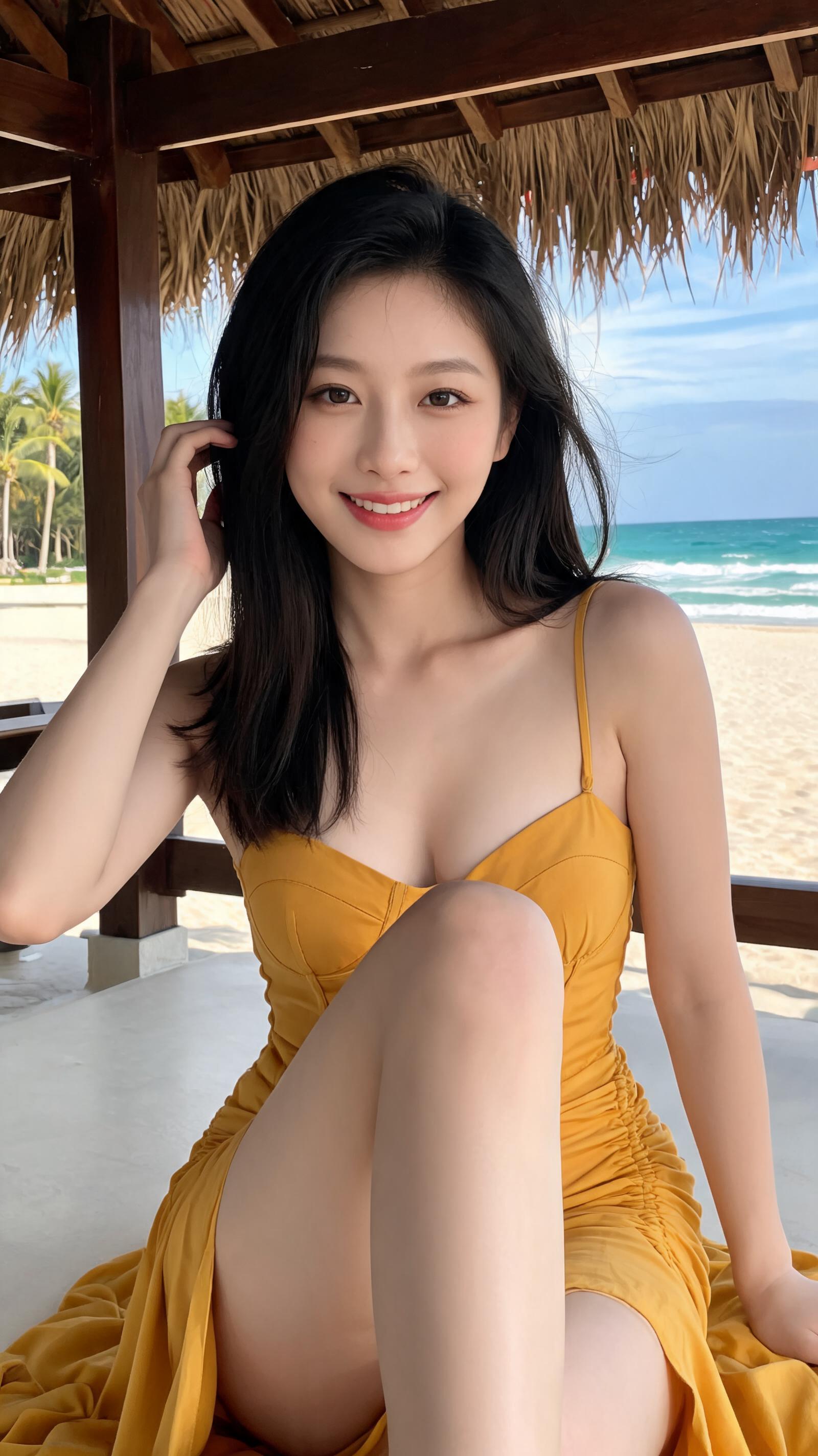
This workflow outputs a verified 2K 9:16 vertical portrait of a 24-30 year old woman seated at a tropical seaside wooden pavilion, with no UI overlays, readable text, or over-stylized influencer features.

Asset
9:16 vertical 2K photographic portrait draft
Format
Model default · 2K
Model
Doubao Seedream 5.0 Lite

8 credits per image

Your references, identity direction, and approved creative context stay reusable inside the Project.

Sample generatedGenerated with · Doubao Seedream 5.0 LiteUpdated · Jul 29, 2026
Low-Light Flash Tropical Seaside Pavilion Portrait Workflow generated example 1
2K · Model default
OUTPUT 01 / 02

REVIEW REQUIRED
No UI or readable text · Anatomical consistency

Generated output

Inspect the result before you put it to work.

Check the main subject, framing, material detail, and channel requirements at full size before handoff.

Low-Light Flash Tropical Seaside Pavilion Portrait Workflow generated example 1
Generated result · inspect at full size before handoff

What this recipe creates

A repeatable 9:16 vertical 2k photographic portrait draft workflow.

This workflow is built for natural, believable low-light smartphone-style flash portraits that retain realistic anatomy, fabric texture, and subtle environmental detail, with no distracting platform UI elements.

  • 2K 9:16 vertical photographic portrait draft
  • text-free unobscured frame with no UI overlays
  • natural anatomically consistent subject rendering
  • low-light flash lighting matching specified parameters
9:16 vertical social media portrait assetsresort lifestyle stock imageryeditorial travel portrait drafts

Required inputs

  1. specified subject pose reference notes
  2. tropical seaside pavilion location context
  3. warm yellow maxi dress texture reference
  4. post-sunset low-light lighting parameters

How it works

Review the workflow before you create.

4

Use each step as a review gate. If one gate fails, change that input before spending another generation.

01 / STEP

Lock frame constraints to eliminate all UI and text elements

Set base aspect ratio to 9:16, and add every listed forbidden UI element, readable text, and platform branding to the negative prompt before adding subject details.

Quality check · Zoom to all four frame edges and background areas, confirm no icons, counters, text, or watermarks are visible anywhere in the 2K canvas.
02 / STEP

Calibrate pose for low wide-angle camera position

Position the camera at knee height, tilted slightly upward, and define the foreground bent leg as the lower central compositional diagonal, with the subject centered in the frame.

Quality check · Confirm the foreground leg appears subtly elongated but anatomically consistent, no distorted joints or misaligned limb proportions.
03 / STEP

Adjust lighting to match post-sunset frontal flash parameters

Set the key light as a warm neutral frontal flash positioned near the lens, with background exposure pulled 2.5 stops lower than the subject exposure to create the high contrast low-light look.

Quality check · Verify the subject is significantly brighter than the dark pavilion and foliage background, with soft natural highlights on skin and no blown-out featureless white areas on the foreground shin or knees.
04 / STEP

Refine texture to avoid artificial rendering artifacts

Add prompts for natural fabric wrinkles, ruching compression marks, mild seaside hair flyaways, and subtle shadow detail in all low-light areas.

Quality check · Confirm no plastic-like hair highlights, stiff wig texture, or unnatural sequin/metallic fabric rendering appears on the dress or subject hair.

Recommended model and tested settings

Tested setup and quality gates.

Model
Doubao Seedream 5.0 Lite · doubao-seedream-5-0-lite-260128
Style
All outputs are exploration drafts, no production-grade guarantees for perfect anatomy or zero artifacts are provided.
Resolution
2K
Guidance
This workflow is validated for the listed model version only, performance may vary on other image generation models.
Tested
Jul 29, 2026

Quality checklist

No UI or readable textZero platform UI elements, text, logos, counters, or watermarks appear anywhere across the full 2K frame.
Anatomical consistencyAll limbs, facial features, and body proportions look natural, no exaggerated features, oversized eyes, or distorted joints.
Lighting accuracyFrontal flash creates clear separation between the brightly lit subject and dark post-sunset background, no blown-out skin highlights.
Texture realismHair, dress fabric, and rough foreground ground retain natural texture, no plastic, wax, or CGI smooth rendering.
Aspect ratio complianceFinal output is exactly 9:16 vertical 2K resolution, no cropped limbs or truncated compositional elements at frame edges.

Common failure modes

Know what to correct before the next run.

FAILURE / 01

Unwanted short-video UI overlays appear along the frame edges

Add every listed forbidden UI element to the negative prompt field, then re-run generation with a new random seed.

FAILURE / 02

Subject face renders as a generic over-edited influencer face with oversized eyes

Add explicit positive prompts for soft oval face, narrow gentle jaw, and natural proportional eyes, and remove all generic 'beautiful face' keywords from the prompt.

FAILURE / 03

Foreground leg looks unnaturally stretched and anatomically broken

Reduce the wide-angle distortion strength setting by 30%, and add a prompt for natural joint alignment on the foreground knee and ankle.

FAILURE / 04

Dress renders with sequins or plastic sheen instead of matte fabric

Add 'no sequins, no plastic, no glossy fabric' to the negative prompt, and re-run generation to restore natural matte cotton texture.

FAQ

Production notes.

Generated outputs may contain subtle anatomy inconsistencies, misaligned fabric seams, or faint unplanned artifacts, so they require manual retouching before use in high-stakes commercial projects.

The verified output size for this specific workflow is 2K. 4K generation is not validated for this model configuration, so outputs may have unexpected detail errors or resolution mismatches.

Add an explicit exclusion prompt for all readable Latin or non-Latin text, and re-run the generation with a slightly adjusted random seed to replace the text with abstract unreadable curved shapes.

Add explicit positive prompts for high side slit, floor-length mustard yellow fabric, and pooled dress folds near the bottom frame edge, and remove any conflicting casual clothing keywords from your prompt set.