Skip to content

Generate 2K 9:16 vertical romantic vintage editorial portrait exploration drafts for pre-production concept testing

Soft Focus Vintage Romantic Editorial Portrait Workflow

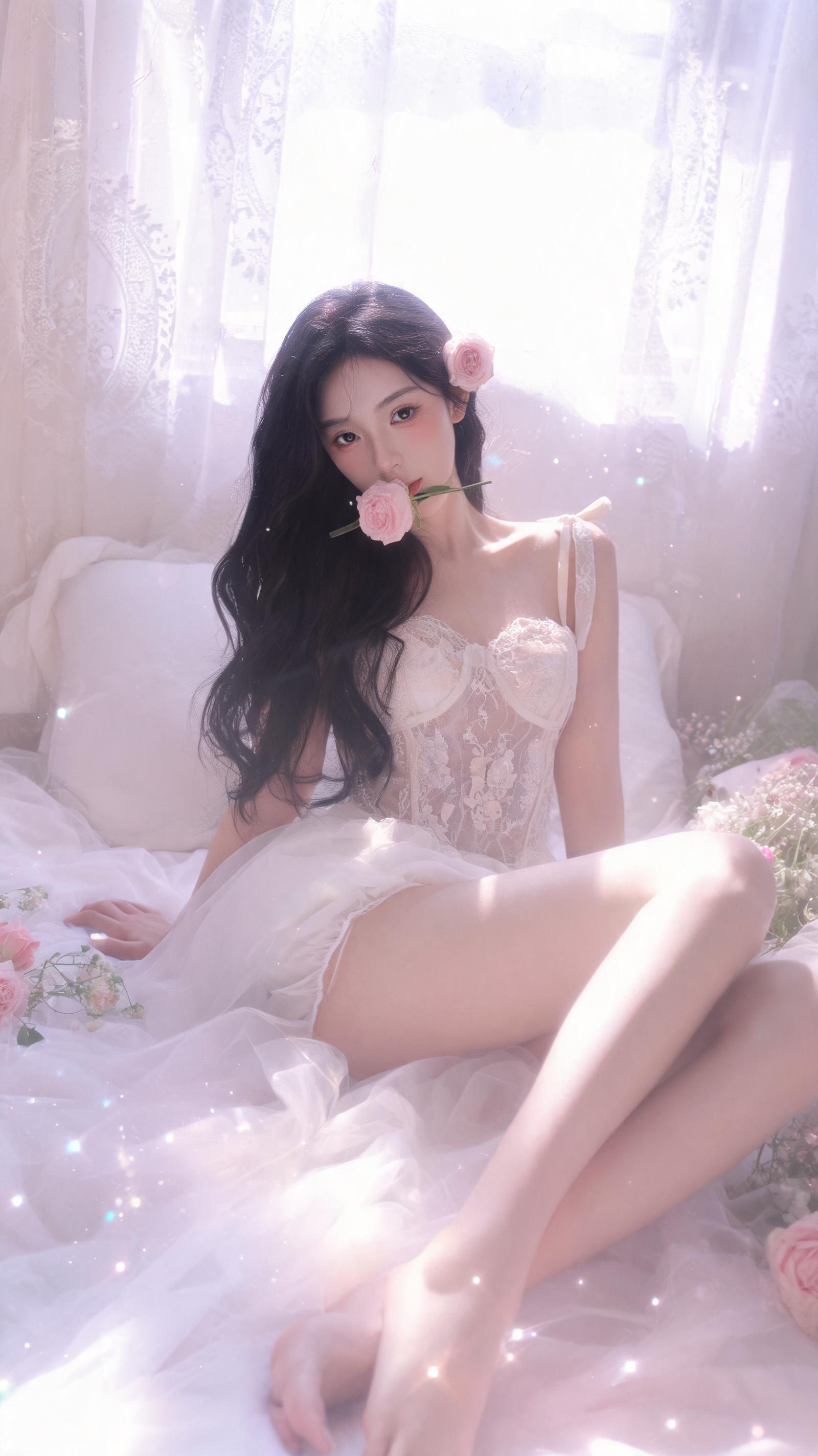
This workflow generates 2K 9:16 vertical exploration drafts of romantic vintage editorial portraits set in a sunlit floral bedroom, with specified East Asian subject styling and 1990s Japanese photobook aesthetic.

Asset
2K photorealistic portrait exploration draft
Format
Model default · 2K
Model
Doubao Seedream 5.0 Lite

8 credits per image

Your references, identity direction, and approved creative context stay reusable inside the Project.

Sample generatedGenerated with · Doubao Seedream 5.0 LiteUpdated · Jul 29, 2026
Soft Focus Vintage Romantic Editorial Portrait Workflow generated example 1
2K · Model default
OUTPUT 01 / 02

REVIEW REQUIRED
Correct Aspect Ratio and Resolution · Aesthetic Consistency

Generated output

Inspect the result before you put it to work.

Check the main subject, framing, material detail, and channel requirements at full size before handoff.

Soft Focus Vintage Romantic Editorial Portrait Workflow generated example 1
Generated result · inspect at full size before handoff

What this recipe creates

A repeatable 2k photorealistic portrait exploration draft workflow.

This workflow is built for generating initial portrait drafts that lean into soft halation, hazy pink-lavender grading, analog film grain and shallow depth of field, ideal for mood testing and concept approval before final photoshoots.

  • 2K 9:16 vertical portrait exploration draft
  • Soft diffused daylight lighting pass
  • Hazy pink-lavender color graded frame
  • Analog film grain and halation effect render
  • Shallow depth of field soft focus result
Pre-shoot portrait concept mood testingVertical social media lifestyle content draftsRomantic editorial storyboarding

Required inputs

  1. Subject character styling brief
  2. Bedroom scene environment details
  3. Desired lighting and color grading rules
  4. 2K 9:16 vertical output resolution selection

How it works

Review the workflow before you create.

4

Use each step as a review gate. If one gate fails, change that input before spending another generation.

01 / STEP

Set Correct 2K 9:16 Output Resolution First

Open your model generation settings panel, select the 2K resolution preset, then manually adjust the aspect ratio to 9:16 before entering any prompt text.

Quality check · Confirm the output canvas dimensions read 1440px width by 2560px height before submitting the generation request.
02 / STEP

Lock Subject Facial Feature Consistency

Add explicit age marker (young adult, 20s-30s) and East Asian ethnicity note at the very top of your prompt block, place the peach blush and glossy rose lip detail directly after the face shape description.

Quality check · The generated subject does not appear underage, and matches the specified soft Korean-inspired makeup styling with no distorted facial proportions.
03 / STEP

Adjust Halation and Light Leak Intensity

Move the strong creamy highlight bloom and pastel light leaks prompt lines to the dedicated lighting section of your prompt, set generation style weight to 0.85 for aesthetic parameters.

Quality check · Highlights show soft glowing rim light around hair and shoulders, no blown out pure white areas that erase subject or scene detail.
04 / STEP

Reduce Unwanted Anatomy Drift

Add a single line note that the subject's legs are extended toward the foreground with no extra limbs, place this line directly after the pose description.

Quality check · The final draft shows exactly two arms and two legs, no distorted hand or finger shapes around the flower held between the lips.

Recommended model and tested settings

Tested setup and quality gates.

Model
Doubao Seedream 5.0 Lite · doubao-seedream-5-0-lite-260128
Style
All outputs generated with this workflow are creative exploration drafts, not final production assets.
Resolution
2K
Guidance
This workflow works only with the specified model version, no adjustments are required for base model default settings outside of the listed resolution and aspect ratio changes.
Tested
Jul 29, 2026

Quality checklist

Correct Aspect Ratio and ResolutionOutput is exactly 9:16 vertical, 2K resolution with no stretched or cropped edges that cut off the subject's pose or window background.
Aesthetic ConsistencyFrame includes visible analog film grain, soft halation around highlights, and hazy pink-lavender color grading with low contrast and soft, non-harsh shadows.
Subject Styling MatchSubject matches specified East Asian young adult features, lace camisole outfit, and the pale pink rose positioned in hair and between her lips.
Scene Element CompletenessSunlit bedroom background includes sheer embroidered lace curtains, white bedding, and visible floating dust particles in the diffused daylight.
Pose AccuracySubject is angled slightly toward the camera, leaning back with one hand supporting her weight, legs extended toward the foreground with no distorted anatomy.

Common failure modes

Know what to correct before the next run.

FAILURE / 01

Output is 1:1 square aspect ratio instead of 9:16 vertical

Navigate to the generation settings panel, manually set aspect ratio to 9:16, and confirm 2K resolution is selected before resubmitting.

FAILURE / 02

Subject appears as a teenager instead of a clearly defined young adult

Add the line '25 year old East Asian woman, clearly adult' as the first line of the subject description block, then re-run generation.

FAILURE / 03

Halation effect is too strong, erasing all facial detail on the subject's face

Lower the overall style weight slider from 1.0 to 0.8, and move the 'strong highlight bloom' line to the end of the lighting prompt section.

FAILURE / 04

Extra distorted fingers appear around the flower held between the subject's lips

Add the explicit line 'no extra hands near the face, flower stem held only between lips' directly after the pose description, then regenerate.

FAQ

Production notes.

The detail may be buried under higher-weight lighting prompts. Move the hair rose detail line directly after the hair length and texture description in your prompt to prioritize that element.

These outputs are exploration drafts only. The 2K resolution is suitable for concept review and digital mockups, but does not meet standard print resolution requirements for large format editorial spreads.

Add the phrase 'no smile, neutral soft melancholic gaze' directly after the eye contact description to override default cheerful portrait generation biases.

No, this workflow does not generate any intentional text elements, and any accidental generated text on fabric or decor will be misspelled and non-functional.