Skip to content

Generate natural candid editorial street fashion portraits with authentic panning motion blur effects

Realistic Panning Motion Blur Fashion Street Portrait Workflow

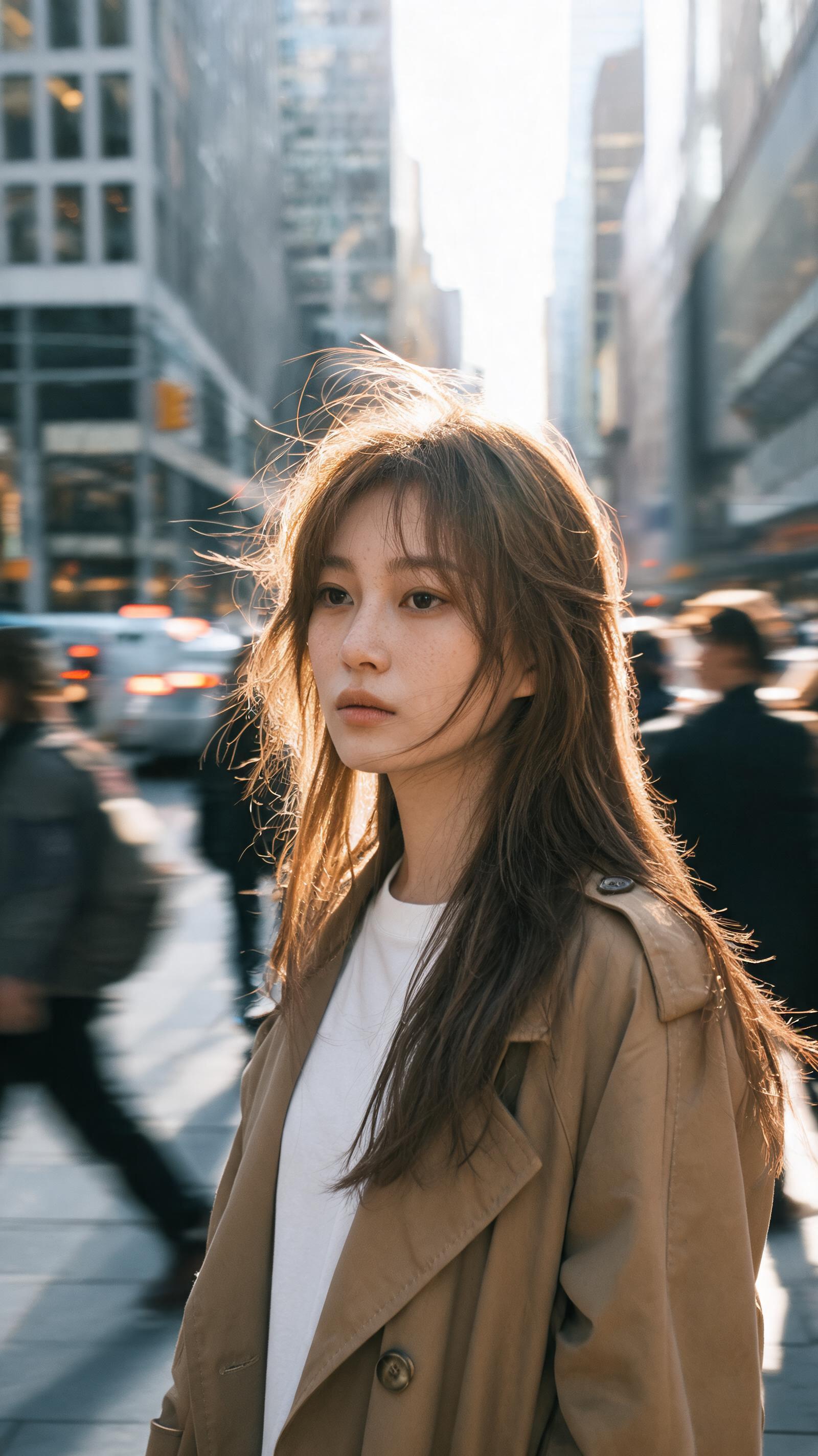
This workflow produces 2K vertical 9:16 draft street fashion portraits with authentic panning motion blur, natural skin texture, and wind-blown hair, designed to avoid overprocessed AI beauty aesthetics.

Asset
2K 9:16 vertical photographic street portrait exploration draft
Format
Model default · 2K
Model
Doubao Seedream 5.0 Lite

8 credits per image

Your references, identity direction, and approved creative context stay reusable inside the Project.

Sample generatedGenerated with · Doubao Seedream 5.0 LiteUpdated · Jul 29, 2026
Realistic Panning Motion Blur Fashion Street Portrait Workflow generated example 1
2K · Model default
OUTPUT 01 / 02

REVIEW REQUIRED
Focal point sharpness · Natural motion blur effect

Generated output

Inspect the result before you put it to work.

Check the main subject, framing, material detail, and channel requirements at full size before handoff.

Realistic Panning Motion Blur Fashion Street Portrait Workflow generated example 1
Generated result · inspect at full size before handoff

What this recipe creates

A repeatable 2k 9:16 vertical photographic street portrait exploration draft workflow.

This process outputs exploration drafts of editorial street fashion portraits that mimic real long-lens panning photography, with blurred background traffic and pedestrians, soft golden hour backlighting, and unpolished natural styling that does not look staged for a catalog.

  • 2K resolution 9:16 vertical exploration draft street portrait
  • Natural panning motion blur background effect
  • Wind-blown flyaway hair detail with backlit edges
  • Subtle film grain and low-saturation color grading
Vertical 9:16 Instagram and TikTok fashion B-rollEditorial magazine street style spreadsIndependent fashion brand lookbook supplementary imagery

Required inputs

  1. Preferred wardrobe type (black coat, camel trench, etc.)
  2. Target city location context (downtown, residential, etc.)
  3. Lighting time of day (golden hour, blue hour, etc.)
  4. Desired subtle emotional expression for the subject

How it works

Review the workflow before you create.

4

Use each step as a review gate. If one gate fails, change that input before spending another generation.

01 / STEP

Set core portrait framing and motion blur parameters

Start by defining the 9:16 vertical aspect ratio and 2K output resolution first, to lock the canvas size before adding detail prompts. Specify that the panning motion blur only applies to background elements, not the subject’s face and eyes, to keep the focal point sharp.

Quality check · Subject’s face and eyes are 100% in focus, no blur artifacts appear on skin or hair strands near the face
02 / STEP

Refine hair and skin detail prompts

Add specific language for wind-blown flyaway strands, backlit glowing hair edges, and natural skin texture including subtle pores and minor imperfections, to avoid over-smooth AI beauty rendering.

Quality check · Hair has at least 5 distinct loose flyaway strands, no plastic-like smooth skin finish appears on the subject’s face or arms
03 / STEP

Adjust lighting and color grading settings

Input your selected lighting type (golden hour backlight, diffused urban light, cinematic street light) and specify low-saturation color grading plus subtle 35mm film grain to match long-lens street photography aesthetics.

Quality check · Background light streaks are soft and natural, no over-saturated neon or bright color casts wash out the subject’s silhouette
04 / STEP

Filter out over-staged styling artifacts

Add negative prompts to exclude staged catalog poses, perfect studio hair, and obvious AI beauty filters, to ensure the final output reads as a candid captured moment.

Quality check · Subject’s pose looks unposed and relaxed, no stiff, catalog-style model posture appears in the frame

Recommended model and tested settings

Tested setup and quality gates.

Model
Doubao Seedream 5.0 Lite · doubao-seedream-5-0-lite-260128
Style
This workflow is tested for 2K 9:16 vertical output only. Outputs are exploration drafts, not final production assets. Adjust prompt weights for motion blur if background effects appear too strong or too faint.
Resolution
2K
Guidance
This workflow does not require custom LoRA assets to run. All prompts work with base model default settings.
Tested
Jul 29, 2026

Quality checklist

Focal point sharpnessSubject’s face, eyes, and upper torso are fully in focus, no unintended motion blur appears on the primary portrait subject.
Natural motion blur effectBackground pedestrians, passing vehicles, and distant architecture have consistent, directionally aligned panning blur that matches real camera panning movement, no random distorted artifacts.
Realistic skin textureSkin retains subtle natural texture, minor imperfections, and no over-smoothed airbrushed finish that signals AI-generated beauty rendering.
Authentic hair detailHair has distinct wind-blown strands, visible flyaways, and soft backlit edges, no uniform plastic-like perfect styling.
Candid aestheticSubject’s pose and surrounding environment feel un-staged, no obvious catalog-style fashion posing or overly arranged wardrobe placement.

Common failure modes

Know what to correct before the next run.

FAILURE / 01

Motion blur is applied to the subject’s face, making features unreadable

Add explicit text that motion blur only affects elements 2+ meters behind the subject, and re-run generation with no other prompt changes.

FAILURE / 02

Hair looks flat, perfectly styled, and has no movement

Add 2-3 specific phrases for loose messy strands and wind-blown movement to the hair description section, remove any references to neat hairstyling.

FAILURE / 03

Output has over-saturated bright colors that break the editorial mood

Add explicit low-saturation color grading and 35mm Kodak Portra film grain modifiers to the lighting prompt, no other adjustments needed.

FAILURE / 04

Wardrobe looks like a staged high-fashion catalog outfit that does not fit the street setting

Add a line that the outfit shows minor natural creases and slight wear, no perfectly pressed, unwrinkled studio clothing.

FAQ

Production notes.

This happens when the motion blur prompt is not explicitly restricted to background elements. Add a clear instruction that only pedestrians, traffic, and architecture in the background receive panning blur, and re-run the generation.

Add specific negative prompts for airbrushed skin, perfect symmetrical facial features, and zero skin imperfections, and include a reference to 35mm film grain to add subtle texture across the full frame.

These outputs are exploration drafts at 2K resolution, which is suitable for web and small-format print. For large-format assets, you will need to run the draft through a separate upscaling workflow to increase resolution.

Add explicit language for loose strands, flyaway hairs, and slight messy movement, and remove any references to polished studio hairstyling from your positive prompt.