Skip to content

Generate natural candid golden hour autumn street lifestyle portrait drafts

Golden Hour Candid Autumn Street Lifestyle Portrait Workflow

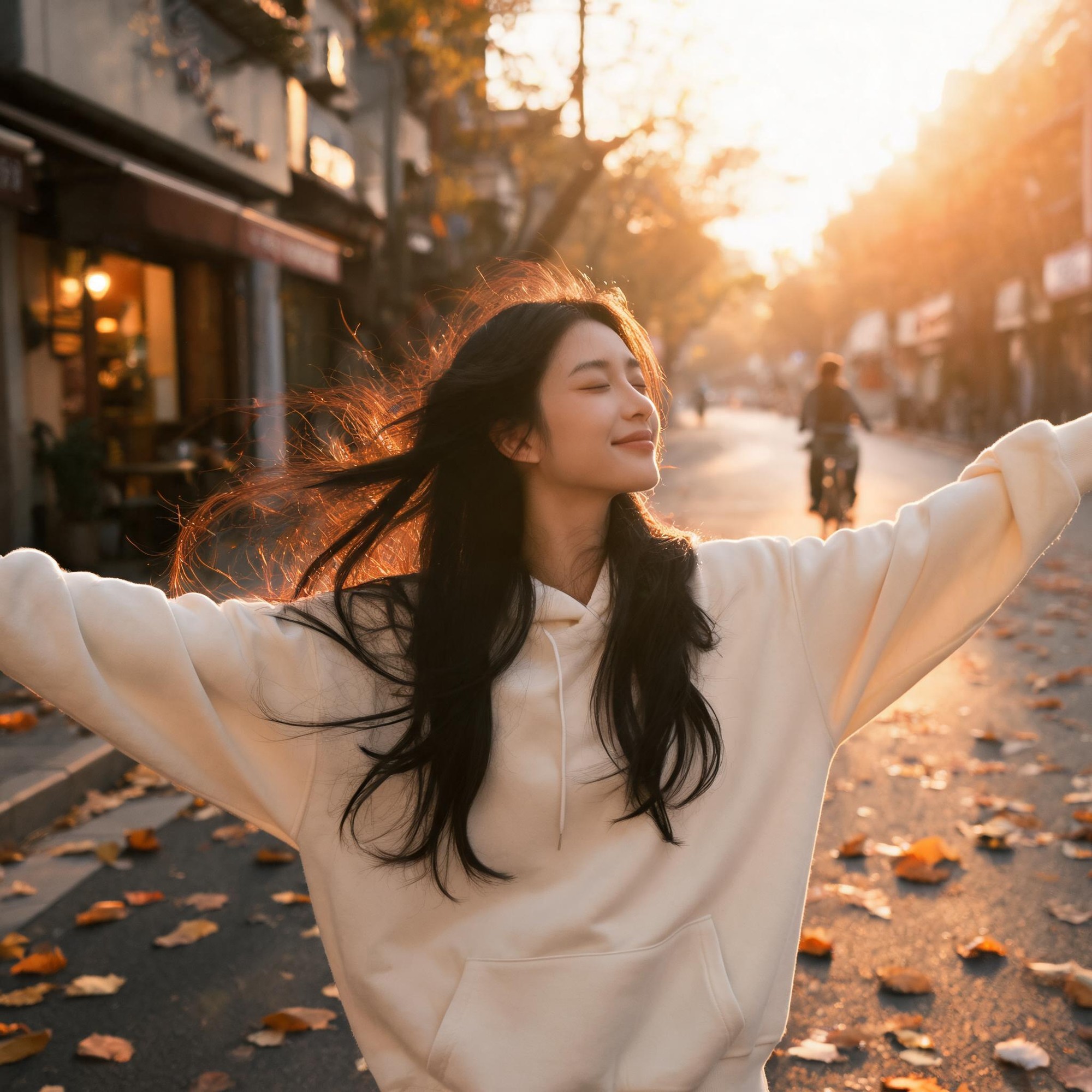
This pre-built prompt and negative prompt set outputs a 2K realistic candid portrait of a carefree young woman on a quiet urban autumn street during golden hour, with natural skin texture, soft rim lighting, and shallow depth of field.

Asset
2K realistic lifestyle portrait image
Format
Model default · 2K
Model
Doubao Seedream 5.0 Lite

8 credits per image

Your references, identity direction, and approved creative context stay reusable inside the Project.

Sample generatedGenerated with · Doubao Seedream 5.0 LiteUpdated · Jul 29, 2026
Golden Hour Candid Autumn Street Lifestyle Portrait Workflow generated example 1
2K · Model default
OUTPUT 01 / 02

REVIEW REQUIRED
Natural Skin Texture · Consistent Golden Hour Lighting

Generated output

Inspect the result before you put it to work.

Check the main subject, framing, material detail, and channel requirements at full size before handoff.

Golden Hour Candid Autumn Street Lifestyle Portrait Workflow generated example 1
Generated result · inspect at full size before handoff

What this recipe creates

A repeatable 2k realistic lifestyle portrait image workflow.

This workflow is tuned to produce natural, unposed lifestyle portrait drafts for creative projects, with guardrails against common anatomy and rendering artifacts. All outputs are 2K resolution as verified for the target model.

  • 2K resolution candid golden hour portrait image
  • Shallow depth of field bokeh background
  • Natural soft rim lighting around subject hair and face
  • Subtle autumn fallen leaf street details
  • Unposed carefree subject pose
Lifestyle social media contentEditorial blog header imageryPersonal creative portfolio assets

Required inputs

  1. Full positive prompt text
  2. Full negative prompt text
  3. 2K output resolution toggle
  4. Desired portrait aspect ratio

How it works

Review the workflow before you create.

3

Use each step as a review gate. If one gate fails, change that input before spending another generation.

01 / STEP

Lock in 2K Output Resolution Before Prompt Submission

Start by adjusting your model's output size settings first before pasting any prompt text to avoid downscaling or upscaling artifacts that break fine detail.

Quality check · Confirm the output dimension preview shows a minimum of 2048 pixels on the longest edge before submitting your prompt.
02 / STEP

Adjust Pose Weight to Preserve Carefree Stance

Tweak the subject pose weight slider between 0.7 and 0.9 to keep the outstretched arm pose intact without distorting surrounding background elements.

Quality check · Preview the generation thumbnail to confirm both arms are fully visible and not clipped by the frame edge.
03 / STEP

Tune Lighting Intensity for Natural Rim Light

Adjust the lighting detail weight to 0.85 to ensure the golden rim light wraps around the subject's hair and face without overexposing skin highlights.

Quality check · Inspect the generated image to confirm no blown-out white patches appear on the subject's hairline or shoulder edges.

Recommended model and tested settings

Tested setup and quality gates.

Model
Doubao Seedream 5.0 Lite · doubao-seedream-5-0-lite-260128
Style
This workflow is tested exclusively for the listed model version. Outputs may vary if run on other untested image generation models.
Resolution
2K
Guidance
All prompt and negative prompt values are calibrated to work without modification on the target model. No third-party LoRA assets are required.
Tested
Jul 29, 2026

Quality checklist

Natural Skin TextureNo over-smooth artificial skin appearance, with subtle realistic skin detail visible on the subject's face and exposed arms.
Consistent Golden Hour LightingAll light sources in the scene match warm low-angle golden hour sun, no mismatched cool or harsh artificial light patches.
No Render ArtifactsNo extra limbs, distorted hands, text, watermarks, or cartoon stylization present in the final generated frame.
Cohesive Autumn AtmosphereVisible fallen leaves on the street and warm soft color grading that matches a cozy autumn urban setting.

Common failure modes

Know what to correct before the next run.

FAILURE / 01

Subject's arms are distorted or have extra fingers

Lower generation speed by one setting tier and re-submit the prompt with the same seed value.

FAILURE / 02

Rim light around the subject is overexposed and blown out

Increase the highlight clipping protection value by 0.2 and re-run the generation.

FAILURE / 03

Background bokeh is sharp and not blurred

Reduce the scene detail weight by 0.2 to prioritize shallow depth of field rendering for distant background elements.

FAILURE / 04

Subject's hair looks stiff and not wind-blown

Increase the dynamic motion detail weight by 0.15 to render flowing, wind-animated hair strands.

FAQ

Production notes.

This workflow generates 2K resolution drafts only. You will need to run a separate upscaling pass to reach print-ready resolution for physical distribution.

Lower the generation speed setting by one tier to give the model more rendering passes to resolve fine anatomy details, then re-run the generation with the same seed.

Shallow depth of field settings push far background elements out of focus. Increase the scene detail weight by 0.15 to make distant background assets more distinct.

Use the same fixed seed value for all consecutive generations to reduce identity drift, though minor facial feature variation will still appear across renders.