Skip to content

Generate early-stage dark coquette balletcore fashion magazine cover concept drafts

Dark Coquette Balletcore Fashion Magazine Cover Collage

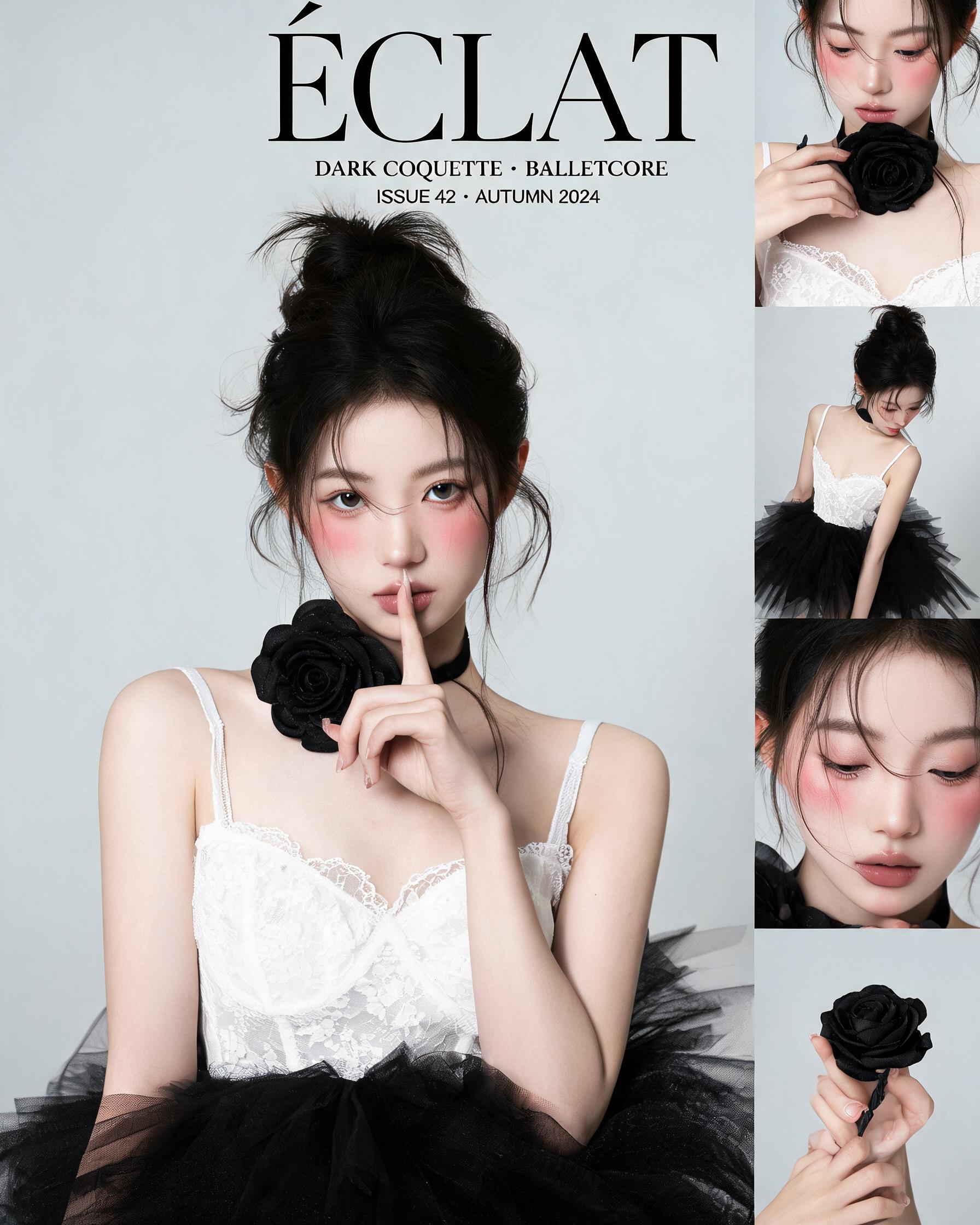
This workflow outputs a 2K 4:5 resolution fashion magazine cover exploration draft that combines a primary medium portrait of a dark coquette balletcore subject with a vertical grid of smaller supporting poses on a minimalist light gray studio background.

Asset
2K fashion magazine cover collage exploration draft
Format
Model default · 2K
Model
Doubao Seedream 5.0 Lite

8 credits per image

Your references, identity direction, and approved creative context stay reusable inside the Project.

Sample generatedGenerated with · Doubao Seedream 5.0 LiteUpdated · Jul 29, 2026
Dark Coquette Balletcore Fashion Magazine Cover Collage generated example 1
2K · Model default
OUTPUT 01 / 02

REVIEW REQUIRED
Aesthetic Alignment · Layout Structure

Generated output

Inspect the result before you put it to work.

Check the main subject, framing, material detail, and channel requirements at full size before handoff.

Dark Coquette Balletcore Fashion Magazine Cover Collage generated example 1
Generated result · inspect at full size before handoff

What this recipe creates

A repeatable 2k fashion magazine cover collage exploration draft workflow.

The generated draft uses soft studio lighting, low color saturation, and detailed fabric and skin texture to match the moody, rebellious dark coquette aesthetic, intended for early-stage editorial concept validation.

  • 2K 4:5 aspect ratio cover collage draft
  • Primary medium shot portrait of the subject with shh gesture
  • Vertical grid of small secondary cinematic poses
  • Low-saturation matte color grade
  • Visible fine tulle and skin texture
Early fashion cover concept mockupsDark coquette aesthetic mood boardsBalletcore style reference assets

Required inputs

  1. Core subject aesthetic description (dark coquette balletcore)
  2. Specified subject features (high bun, lace camisole, tulle skirt, rose choker)
  3. Layout rule (main left portrait + right vertical pose grid)
  4. Background specification (minimalist light gray studio)

How it works

Review the workflow before you create.

3

Use each step as a review gate. If one gate fails, change that input before spending another generation.

01 / STEP

Set Core Subject Parameters to Match Aesthetic Rules

Input the full subject feature list including high messy bun, white lace camisole, black tulle skirt, oversized black rose choker, and shh finger-to-lip pose facing the camera.

Quality check · Confirm the generated subject matches all listed physical and clothing details before moving to layout adjustments.
02 / STEP

Define Collage Layout and Background Constraints

Specify the split layout with a main medium shot on the left 60% of the frame, and a 4-row vertical grid of smaller poses on the remaining right 40%, paired with a solid light gray seamless studio background.

Quality check · No extra decorative elements appear on the background, and the two layout zones are clearly separated with no overlapping content.
03 / STEP

Adjust Lighting and Color Settings for Moody Tone

Set lighting to soft diffused studio key light with subtle fill shadows, and lock color saturation to 30% below default output levels to get the muted matte finish.

Quality check · No harsh highlights on skin or tulle fabric, and bright saturated accent colors do not appear anywhere in the frame.

Recommended model and tested settings

Tested setup and quality gates.

Model
Doubao Seedream 5.0 Lite · doubao-seedream-5-0-lite-260128
Style
All outputs are 2K 4:5 aspect ratio exploration drafts for concept testing, not final production assets.
Resolution
2K
Guidance
This workflow does not support custom embedded text generation, any text added to the prompt will render as unreadable false orthography.
Tested
Jul 29, 2026

Quality checklist

Aesthetic AlignmentOutput matches dark coquette and balletcore visual cues, no conflicting bright pop colors or unrelated streetwear elements appear.
Layout StructureMain medium portrait sits on the left half of the frame, vertical small pose grid occupies the right half with no overlapping elements.
Texture DetailFine tulle fabric weave, lace trim edges, and natural skin texture are visible without over-sharpening or artificial smoothing.
Color GradeOverall low color saturation, matte finish, prominent soft blush on the subject’s cheeks, no high-contrast neon tones.
Pose AccuracyPrimary subject in the left frame holds the shh finger-to-lip gesture and looks directly at the camera.

Common failure modes

Know what to correct before the next run.

FAILURE / 01

Right-side pose grid contains distorted anatomy, such as extra fingers or misaligned limbs

Reduce the number of requested small poses in the grid from 6 to 3, then re-run the generation.

FAILURE / 02

Background has random decorative elements like flowers or wall art instead of plain light gray

Add the phrase "no extra objects, 100% seamless solid light gray studio backdrop" to the end of your input prompt.

FAILURE / 03

Subject’s choker is missing or replaced with a small thin necklace

Move the oversized black rose fabric choker description to the first line of your subject feature list to raise its priority.

FAILURE / 04

Output has high color saturation that breaks the moody muted aesthetic

Add the explicit instruction "subtle desaturated matte film look, no vibrant colors" to your lighting and color parameter section.

FAQ

Production notes.

No, this output is an exploration draft for concept validation only. You will need to retouch, upscale, and adjust layout alignment manually before using it for final print distribution.

Multi-pose collage generation often causes minor identity drift across separate portrait instances. You can re-run the generation with a reference portrait of the subject added to the input to reduce this inconsistency.

Yes, the plain light gray background provides empty negative space for you to overlay custom typography, masthead text, and brand marks in post-processing.

The verified output size follows a 4:5 aspect ratio, which fits standard magazine cover proportions for both digital previews and small-format print test runs.