Skip to content

Generate mood-driven, naturalistic low-key cinematic portrait exploration drafts for creative portfolio and editorial reference

2K Cinematic Low-Key Indoor Female Portrait Workflow

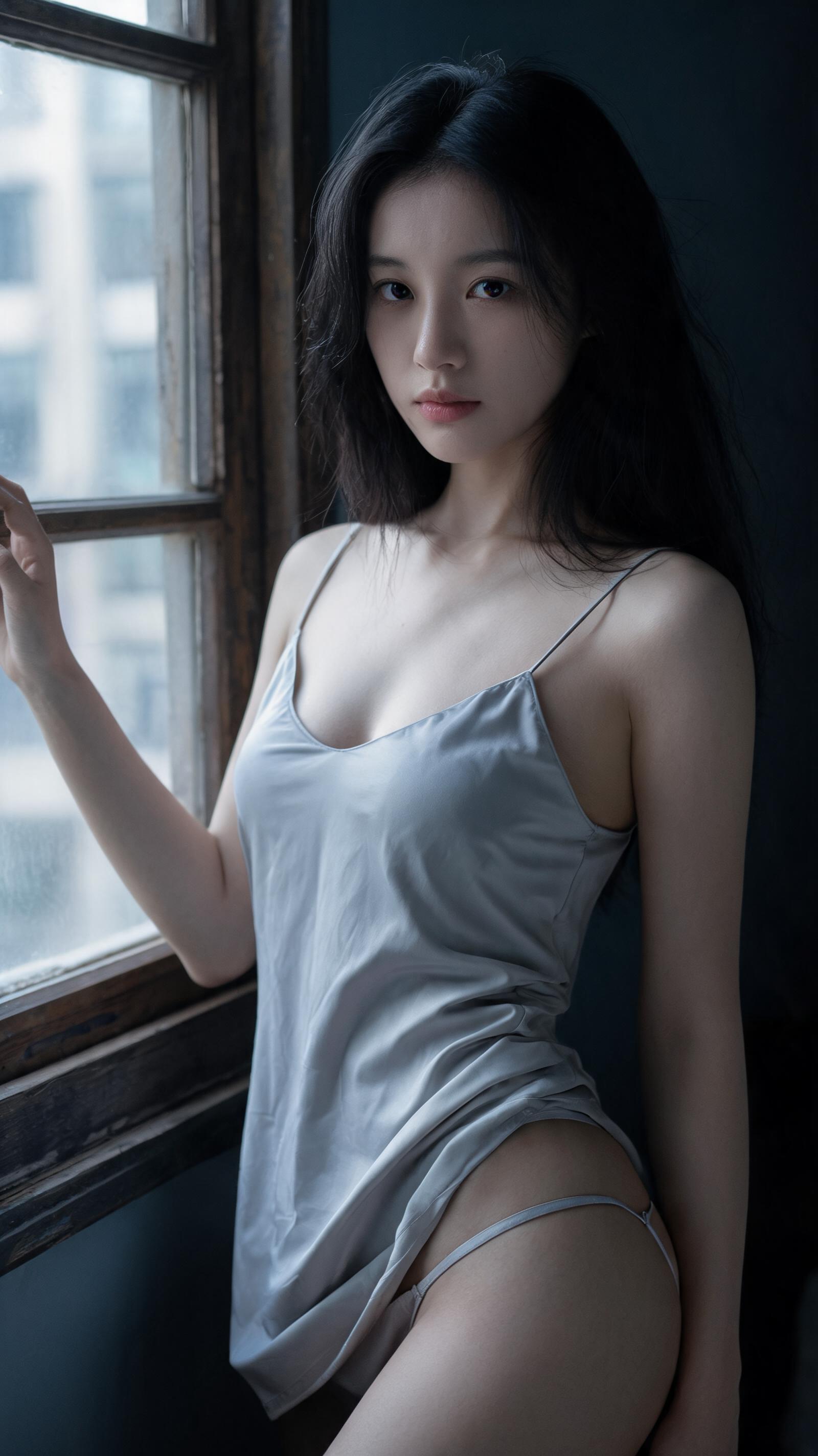
All outputs from this workflow are exploration drafts, not final production photography assets, that capture a quiet, intimate cinematic still of a young adult East Asian woman beside a worn vintage window in a low-light interior.

Asset
2K resolution cinematic portrait still image
Format
Model default · 2K
Model
Doubao Seedream 5.0 Lite

8 credits per image

Your references, identity direction, and approved creative context stay reusable inside the Project.

Sample generatedGenerated with · Doubao Seedream 5.0 LiteUpdated · Jul 29, 2026
2K Cinematic Low-Key Indoor Female Portrait Workflow generated example 1
2K · Model default
OUTPUT 01 / 02

REVIEW REQUIRED
Pose and Proportion Accuracy · Lighting Control

Generated output

Inspect the result before you put it to work.

Check the main subject, framing, material detail, and channel requirements at full size before handoff.

2K Cinematic Low-Key Indoor Female Portrait Workflow generated example 1
Generated result · inspect at full size before handoff

What this recipe creates

A repeatable 2k resolution cinematic portrait still image workflow.

This workflow prioritizes natural body proportions, unretouched skin texture, and restrained lighting to avoid the common pitfalls of over-filtered, exaggerated commercial portrait generation.

  • 2K resolution near-full-body portrait draft
  • Natural depth of field blurred background
  • Controlled chiaroscuro lighting distribution
  • Muted cool blue-gray low-saturation color grade
  • Subtle fine film grain overlay
Fine art portrait series developmentIndependent film reference stillsEditorial lifestyle feature imagery

Required inputs

  1. Base subject age and facial structure specification
  2. 2K output resolution flag
  3. 50-85mm portrait lens framing rule
  4. Left-side soft overcast window light guide

How it works

Review the workflow before you create.

4

Use each step as a review gate. If one gate fails, change that input before spending another generation.

01 / STEP

Lock in Correct Subject Proportions and Pose

Set the subject age range to 22-26, specify no exaggerated body proportions, no over-stylized facial features, and define the relaxed S-curve stance with one hand resting on the window frame and the other resting lightly on the upper thigh.

Quality check · The generated figure has natural, non-distorted limb proportions, no over-exaggerated bust or hip sizing, and the subject is facing mostly toward the camera with a slight torso turn.
02 / STEP

Calibrate Low-Key Lighting Distribution

Specify that soft overcast light enters only from the left side of the frame, set a hard limit on highlight brightness to prevent blowout, and add a note that dark areas must retain visible detail with no pure black clipping.

Quality check · The subject's face is the brightest element in the frame, no facial features are lost in shadow, and highlights on the dress fabric do not draw focus away from the subject's quiet expression.
03 / STEP

Apply Restrained Film Texture and Color Grading

Set film grain intensity to 5% of maximum, specify low-saturation cool neutral color profile, and add a rule to retain natural skin texture including pores and fine lip lines.

Quality check · No heavy smoothing or plastic-looking skin appears, the full frame is not tinted heavy blue, and grain is subtle enough that fine facial details remain clearly visible.
04 / STEP

Set Correct Framing and Depth of Field

Specify 50mm focal length, position the subject slightly right of center, and set the background window and distant wall to render with soft natural bokeh.

Quality check · The old window frame on the left side of the frame is fully visible, the distant exterior building view is softly blurred, and no harsh digital edge artifacts appear around the subject's silhouette.

Recommended model and tested settings

Tested setup and quality gates.

Model
Doubao Seedream 5.0 Lite · doubao-seedream-5-0-lite-260128
Style
All outputs are limited to 2K maximum resolution, no larger size outputs are supported with this workflow.
Resolution
2K
Guidance
This workflow is calibrated specifically for the listed model version, parameters may produce unexpected results if run on other untested image generation models.
Tested
Jul 29, 2026

Quality checklist

Pose and Proportion AccuracySubject has natural relaxed S-curve stance, no distorted limbs, no exaggerated body proportions, and hands are positioned correctly with one resting on the window frame.
Lighting ControlLeft-side soft overcast side light creates clear chiaroscuro separation, no pure black clipped shadows, no blown out highlights, and the subject's face is the visual center of the frame.
Color Grade ConsistencyLow-saturation cool neutral blue-gray dark tone, no heavy full-frame blue tint, natural cool white skin tone that is not overly pale or washed out.
Texture FidelityNatural unretouched skin texture with visible fine pores and lip lines, subtle fine film grain, no heavy digital smoothing that creates plastic-looking skin.
Framing and Depth of FieldSubject positioned slightly right of center, full old window frame visible on the left, background elements softly blurred, natural optical vignetting that does not cut off edge details.

Common failure modes

Know what to correct before the next run.

FAILURE / 01

Subject's face is partially hidden in shadow, no visible catchlights in eyes

Add a single line specifying very weak cool neutral ambient bounce light to gently lift the facial shadow areas, no other parameter changes needed.

FAILURE / 02

Output has heavy over-saturated colors, no muted cinematic tone

Move the low-saturation cool neutral color grade rule to the first 3 lines of your prompt, remove any references to high-saturation filter effects.

FAILURE / 03

Generated figure has distorted, over-exaggerated hip or bust proportions

Add an explicit line that all body proportions are natural, real human, non-exaggerated, no over-stylized figure rendering.

FAILURE / 04

No visible fine film grain, output looks like a sharp digital illustration

Increase the film grain intensity value by 2 small increments, add a note that grain should match 35mm film stock output, not digital render noise.

FAQ

Production notes.

All outputs from this workflow are exploration drafts. You will still need minor post-processing adjustments to fine-tune shadow levels, color balance, and grain intensity to match your exact project requirements.

Add an explicit constraint line that all posing and clothing rendering must be restrained, no exaggerated fabric transparency, no over-exposed skin areas, and the overall mood is quiet and intimate rather than performative.

This is a common generation drift issue. Fix it by re-running the generation with a single added line specifying narrow oval face shape, low soft cheekbones, and no over-defined sharp jawline.

You must first confirm that your generated asset has no identity drift, and verify your AI provider's terms of service for commercial usage rights before delivering any output to paying clients.