Skip to content

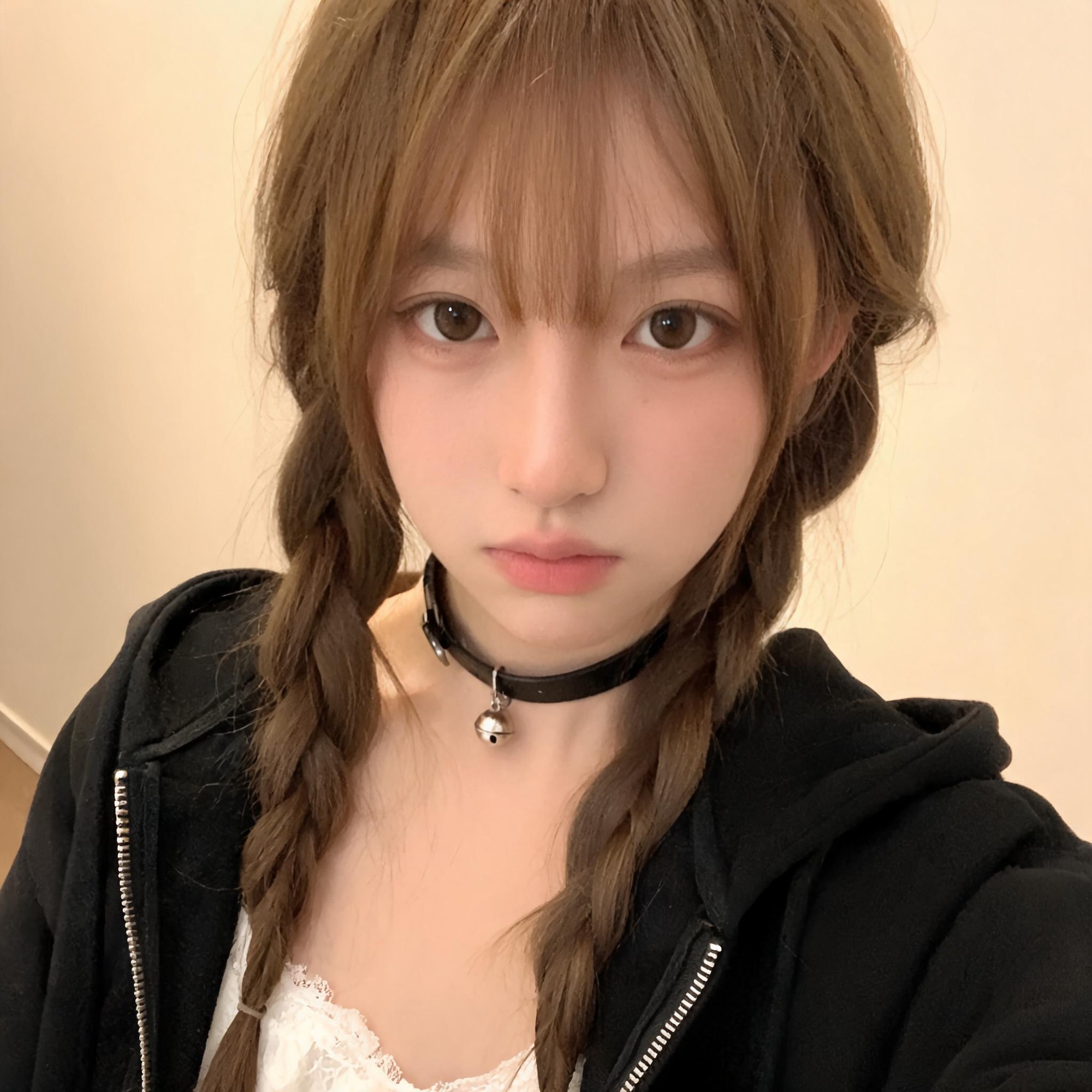
Generate authentic candid mobile-style lifestyle portrait exploration drafts for casual social media use

2K Candid Smartphone Aesthetic Lifestyle Portrait

This workflow outputs 2K resolution portrait exploration drafts designed to appear as unedited candid shots taken with a consumer smartphone, no obvious AI rendering artifacts, for lifestyle social media use.

Asset
2K photorealistic candid indoor portrait image
Format
Model default · 2K
Model
Doubao Seedream 5.0 Lite

8 credits per image

Your references, identity direction, and approved creative context stay reusable inside the Project.

Sample generatedGenerated with · Doubao Seedream 5.0 LiteUpdated · Jul 29, 2026
2K Candid Smartphone Aesthetic Lifestyle Portrait generated example 1
2K · Model default
OUTPUT 01 / 02

REVIEW REQUIRED
2K Resolution Compliance · Natural Skin Texture

Generated output

Inspect the result before you put it to work.

Check the main subject, framing, material detail, and channel requirements at full size before handoff.

2K Candid Smartphone Aesthetic Lifestyle Portrait generated example 1
Generated result · inspect at full size before handoff

What this recipe creates

A repeatable 2k photorealistic candid indoor portrait image workflow.

This workflow is built to produce natural, low-fuss portrait assets that avoid the oversharp, overproduced look of studio or AI-generated imagery, matching the casual aesthetic of personal Instagram lifestyle posts.

  • 2K resolution candid portrait image
  • Natural subtle digital grain matching mobile camera output
  • Soft unposed subject expression
  • No visible text, logos or watermarks
Casual lifestyle social media post assetsPersonal brand profile imageryUnscripted editorial portrait drafts

Required inputs

  1. Subject core physical features description
  2. Casual indoor background specification
  3. Clothing and accessory detail list
  4. Ambient warm lighting parameter notes

How it works

Review the workflow before you create.

4

Use each step as a review gate. If one gate fails, change that input before spending another generation.

01 / STEP

Set base subject and scene parameters for authentic mobile look

Start by defining the subject's physical features, clothing, and casual indoor background without referencing studio lighting or professional camera gear.

Quality check · Generated draft does not show any studio-style hard key lighting or overly smoothed plastic skin.
02 / STEP

Add subtle mobile camera artifacts to reduce AI render tells

Include explicit notes for subtle digital noise, soft handheld framing offset, and natural unretouched skin texture in your prompt parameters.

Quality check · Output has faint uniform grain across the frame that matches typical smartphone HDR output, no perfectly sharp edges across all elements.
03 / STEP

Remove unwanted overlay elements from final output

Add explicit exclusion rules for text, watermarks, logos, and branded camera UI in your generation settings.

Quality check · Final 2K image has no visible text, branded marks, or DSLR-style shallow depth of field that does not match mobile camera behavior.
04 / STEP

Validate expression and framing for candid feel

Specify a calm, slightly serious direct gaze rather than a forced posed smile, and avoid perfectly centered subject framing.

Quality check · Subject does not have an overexaggerated posed expression, and the framing looks like a spontaneous handheld shot rather than a planned studio composition.

Recommended model and tested settings

Tested setup and quality gates.

Model
Doubao Seedream 5.0 Lite · doubao-seedream-5-0-lite-260128
Style
This workflow is tested for 2K portrait generation only, do not use for 4K or larger output sizes as resolution will not match requirements.
Resolution
2K
Guidance
Works best for indoor casual portrait subjects, performance may vary for outdoor or complex multi-subject scenes.
Tested
Jul 29, 2026

Quality checklist

2K Resolution ComplianceFinal output matches exact 2K dimensions with no upscaled blurring or stretched edge artifacts.
Natural Skin TextureSkin shows subtle pores and tone variation, no over-smoothed plastic-like rendering.
Subtle Mobile GrainFaint uniform digital noise is present across the full frame, matching typical consumer smartphone camera output.
No Unwanted OverlaysNo text, watermarks, logos, or branded UI elements appear anywhere in the frame.
Casual Lighting MatchLighting is soft warm ambient indoor light, no harsh studio key lights or unnatural rim lighting.

Common failure modes

Know what to correct before the next run.

FAILURE / 01

Output looks like a polished AI render instead of a candid mobile photo

Remove all excess quality-focused keywords from the prompt, and increase the digital noise parameter by 15%.

FAILURE / 02

Subject's facial features are distorted or anatomically incorrect

Add 2-3 specific, clear notes about eye shape and hair texture to the prompt, re-run generation.

FAILURE / 03

Output has visible text or fake logo marks on the hoodie or wall

Add explicit exclusion of all text, logos, and printed graphics to the negative prompt field, re-run.

FAILURE / 04

Lighting is harsh and looks like studio production

Add explicit note that no studio lighting, no flash, only warm room ambient light is allowed, re-run generation.

FAQ

Production notes.

This workflow produces a close approximation draft, small subtle AI artifacts may still be visible on close inspection, so you may need minor post-processing grain adjustment to match exact mobile camera output.

Identity drift is common across separate generation runs, so you will need to use a consistent reference image lock feature if you want to preserve exact subject features across multiple portrait outputs.

Increase the digital noise parameter value by 10% and re-run the generation, do not add extra quality keywords to the prompt as that will increase over-smoothing.

Yes, 2K resolution matches the maximum display size for standard Instagram in-feed portrait posts, no upscaling is required for standard social media publishing.