Skip to content

Generate a 4-second vertical character motion draft with a pre-timed sequence of 3 subtle, controlled downward punches and matching understated expression shifts

4-Second 2K Vertical Subtle Character Punch Sequence Motion Draft

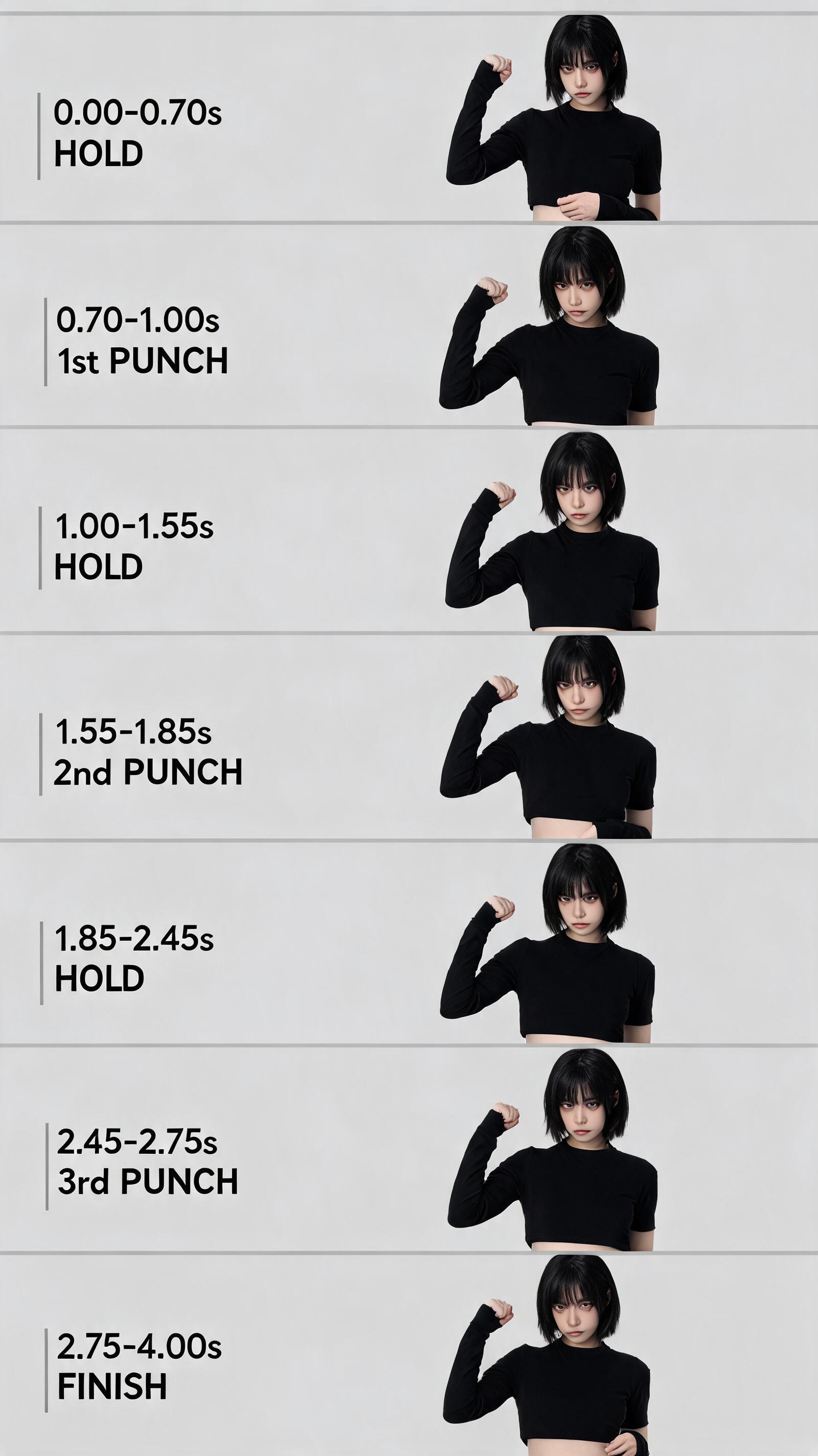
This workflow outputs a 2K resolution 4-second vertical character motion exploration draft that follows a pre-defined sequence of 3 small, controlled downward punches paired with matching subtle expression shifts.

Asset
2K 9:16 vertical character motion exploration draft
Format
Model default · 2K
Model
Doubao Seedream 5.0 Lite

8 credits per image

Your references, identity direction, and approved creative context stay reusable inside the Project.

Sample generatedGenerated with · Doubao Seedream 5.0 LiteUpdated · Jul 29, 2026
4-Second 2K Vertical Subtle Character Punch Sequence Motion Draft generated example 1
2K · Model default
OUTPUT 01 / 02

REVIEW REQUIRED
Consistent Framing · Timing Accuracy

Generated output

Inspect the result before you put it to work.

Check the main subject, framing, material detail, and channel requirements at full size before handoff.

4-Second 2K Vertical Subtle Character Punch Sequence Motion Draft generated example 1
Generated result · inspect at full size before handoff

What this recipe creates

A repeatable 2k 9:16 vertical character motion exploration draft workflow.

This motion generation workflow is designed to produce consistent, non-over-the-top character action clips that hold direct eye contact with the camera through all movement, with clearly timed pauses between each punch to build deliberate, calm rhythm.

  • 2K resolution 9:16 4s MP4 motion draft
  • Frame-by-frame pose sequence preview
  • Timestamped expression beat reference sheet
  • Raw uncompressed clip export
Vertical short social media B-rollMobile app loading screen character animationsIndie game idle reaction clips

Required inputs

  1. Base character reference visual
  2. Neutral background reference asset
  3. Exact 4s total runtime parameter
  4. 9:16 vertical aspect ratio setting

How it works

Review the workflow before you create.

4

Use each step as a review gate. If one gate fails, change that input before spending another generation.

01 / STEP

Set Base Framing and Initial Neutral Pose

First input your selected base character reference, set aspect ratio to 9:16, and position the virtual camera at a high front angle to create a slight downward view of the character.

Quality check · Confirm character stands straight with both feet flat on the ground, torso faces the camera directly, head tilts slightly upward to make unbroken eye contact with the high-positioned camera.
02 / STEP

Program First Punch Timing Beat

Lock the first 0.7 seconds of the clip to hold the raised fist steady above the character’s head, with a calm, neutral slightly stern expression. Set the 0.7s to 1.0s window to trigger the first small downward punch motion, then return the fist to the raised position.

Quality check · No motion blur distorts the character’s face during the hold period, the punch movement stays small and does not extend past the character’s shoulder line.
03 / STEP

Add Second and Third Punch Timing Beats

Insert a 0.55s pause after the first punch returns to the raised position, then trigger the second small punch between 1.55s and 1.85s. Add a 0.6s pause after the second punch, then trigger the third, slightly more defined small punch between 2.45s and 2.75s.

Quality check · Each punch has a clear, distinct pause before it, the third punch is noticeably sharper than the first two but still not exaggerated.
04 / STEP

Lock Final Rest Pose and Export

Set the remaining 1.25s of the timeline to hold the final pose, where the raised fist lowers slightly from its peak position and the character holds a subtle, understated confident expression. Export the clip at 2K resolution.

Quality check · The total clip runtime is exactly 4 seconds, no unexpected extra movements appear in the final 1.25s rest period.

Recommended model and tested settings

Tested setup and quality gates.

Model
Doubao Seedream 5.0 Lite · doubao-seedream-5-0-lite-260128
Style
This workflow is calibrated for the verified 2K output size. Do not enable 4K upscaling during initial generation to avoid unexpected motion artifacts.
Resolution
2K
Guidance
This workflow works for character motion generation only, it does not support complex multi-object interaction sequences.
Tested
Jul 29, 2026

Quality checklist

Consistent FramingCharacter stays centered in the 9:16 2K frame for the full 4 seconds, no unexpected cropping or camera drift.
Timing AccuracyEach punch and pause falls within the specified timestamp ranges, no action runs early or late by more than 0.1 seconds.
Restrained Motion RangeAll punches stay within a small, controlled range, no arm extends past the character’s natural shoulder width.
Consistent Eye ContactCharacter’s eyes stay locked on the high-positioned camera for the full clip, no gaze shifts away from the viewer.
Subtle Expression ShiftsAll facial changes are minimal, no over-exaggerated grins or cartoonish facial distortions appear.

Common failure modes

Know what to correct before the next run.

FAILURE / 01

Character’s arm passes through their head during the raised fist hold

Add a static keyframe for the raised fist position at the 0s mark, then re-generate the full motion sequence.

FAILURE / 02

Character’s face changes shape between the first and third punch

Attach the base character reference as a persistent image control for all frames, then re-run generation.

FAILURE / 03

Total clip runtime is shorter than 4 seconds

Adjust the total runtime parameter to 4s, disable automatic motion speed scaling, then re-export.

FAILURE / 04

Third punch motion is identical to the first two

Set the third punch’s motion intensity 15% higher than the first two punches, then re-generate that segment of the clip.

FAQ

Production notes.

No, all outputs from this workflow are exploration drafts. You will need to manually correct any anatomy glitches, motion drift, or expression inconsistencies before using the clip for final broadcast distribution.

Lock the base character reference as a persistent control layer across all timeline frames before re-running the generation, to reduce unplanned facial feature shifts.

Lower the overall motion intensity parameter by 10% and re-generate, to remove exaggerated movement that breaks the restrained, understated tone.

No, this workflow only generates the visual motion draft. You will need to add custom sound effects separately in your video editing tool.