Skip to content

Generate a consistent 3-panel character reference sheet to reduce identity drift for downstream character video generation

2K 3-Panel 18% Gray Character Reference Sheet

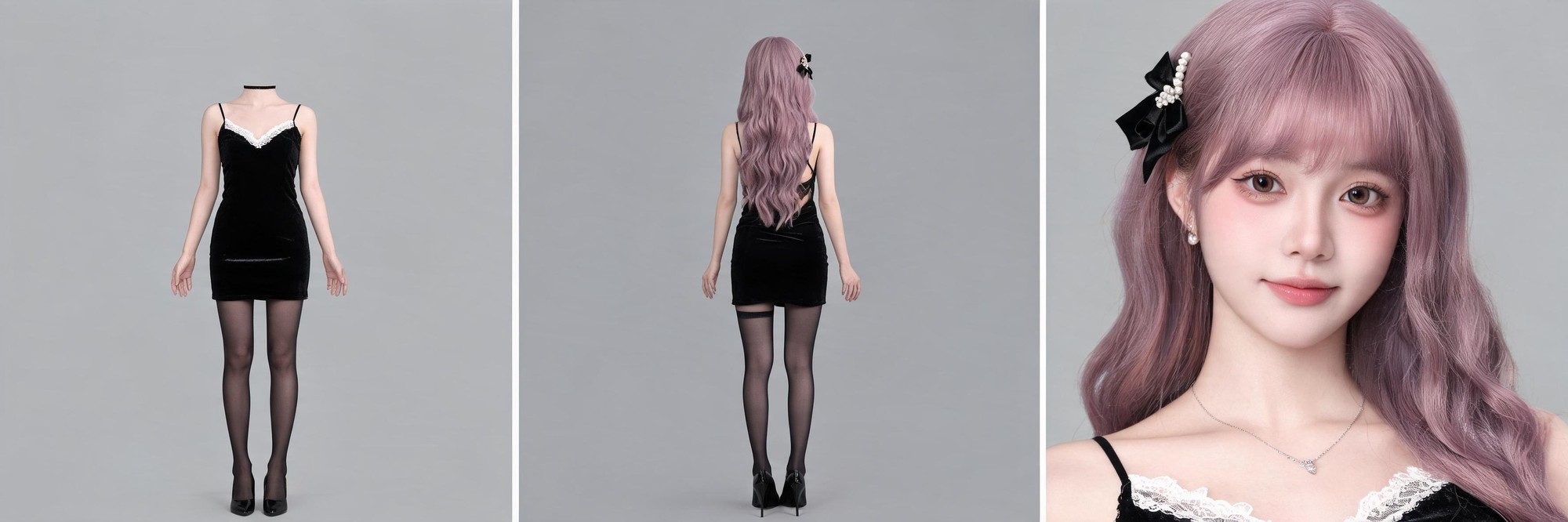
This workflow generates a 2K three-panel character reference sheet with a headless front full body view, back full body view, and chest-up facial closeup, all on a flat 18% gray background with no cast shadows.

Asset
2K 3-panel photorealistic character reference sheet
Format
Model default · 2K
Model
Doubao Seedream 5.0 Lite

8 credits per image

Your references, identity direction, and approved creative context stay reusable inside the Project.

Sample generatedGenerated with · Doubao Seedream 5.0 LiteUpdated · Jul 29, 2026
2K 3-Panel 18% Gray Character Reference Sheet generated example 1
2K · Model default
OUTPUT 01 / 02

REVIEW REQUIRED
Uniform 18% Gray Background · Consistent Character Proportions

Generated output

Inspect the result before you put it to work.

Check the main subject, framing, material detail, and channel requirements at full size before handoff.

2K 3-Panel 18% Gray Character Reference Sheet generated example 1
Generated result · inspect at full size before handoff

What this recipe creates

A repeatable 2k 3-panel photorealistic character reference sheet workflow.

All three panels share identical character design, lighting, and background values to minimize identity inconsistency when the asset is used as a reference for character video generation. All outputs are exploration drafts, not calibrated technical specifications.

  • 2K horizontal 3-panel character reference sheet
  • Headless front full body character view
  • Full back full body character view
  • Chest-up facial identity closeup
  • Zero cast shadow uniform gray background
Pre-production reference for character video generationCharacter design documentationConsistent character look development

Required inputs

  1. Full written character identity and outfit specification
  2. Defined 3 equal vertical panel layout rules
  3. 18% flat gray background parameter
  4. Shadowless frontal lighting setting

How it works

Review the workflow before you create.

4

Use each step as a review gate. If one gate fails, change that input before spending another generation.

01 / STEP

Set Up Base Panel Layout and Background

Start by defining a single horizontal 2K canvas split evenly into three equal vertical sections with thin uniform dividing lines between each panel. Lock the background layer to a flat 18% mid-gray value with no gradients or texture.

Quality check · No color variation across the full background, dividers are uniform thickness, no extra elements appear outside the three defined panels
02 / STEP

Generate Left Headless Front Full Body Panel

Input the full character outfit specification, specify the frame shows the character from shoulder line down to the soles of the shoes, with a clean horizontal cut edge at the base of the neck, no elements above the shoulder line. Disable all shadow and side lighting settings.

Quality check · No hair or head elements appear above the shoulder line, the neck cut edge is sharp with no blur or anatomical details, no cast shadow appears under the character's feet
03 / STEP

Generate Middle Back Full Body Panel

Use the exact same character identity and outfit description as the left panel, specify a straight rear-facing camera angle, full framing from top of the head to the bottom of the shoes. Keep the same shadowless frontal lighting setting.

Quality check · Character height and outfit proportions match the left panel, long hair falls naturally down the back to waist level, no cast shadow appears under the character's feet
04 / STEP

Generate Right Chest-Up Identity Closeup Panel

Reuse the exact same character facial and accessory description from the prior panels, specify a tight framing from above the top of the head down to the upper edge of the character's dress, with the face occupying 70% of the frame. Keep the same shadowless lighting setting.

Quality check · All small facial details and accessories are clearly visible, the character's facial features match the written identity description, no cast shadow appears on the background

Recommended model and tested settings

Tested setup and quality gates.

Model
Doubao Seedream 5.0 Lite · doubao-seedream-5-0-lite-260128
Style
This workflow is tested for 2K horizontal output only. Do not upscale beyond native 2K resolution for reference use.
Resolution
2K
Guidance
This workflow will not produce calibrated orthographic technical sheets, all outputs are exploration drafts for pre-production reference.
Tested
Jul 29, 2026

Quality checklist

Uniform 18% Gray BackgroundAll areas of the canvas across all three panels use a single flat 18% mid-gray value, no gradients, no texture, no stray marks.
Consistent Character ProportionsThe character's height, outfit fit, and limb proportions are identical across the full body left and middle panels, no unexpected size variation.
Sharp Panel DividersThe thin lines separating the three vertical panels are clean, uniform thickness, no blurring or overlapping content across divider edges.
No Cast ShadowsNo shadows appear under the character's feet, on the character's body, or on the background, all illumination is even and front-facing.
Clear Facial Detail In CloseupAll small facial features, hair accessories, and jewelry in the right panel are distinct, no over-smoothing or distorted facial anatomy.

Common failure modes

Know what to correct before the next run.

FAILURE / 01

Character facial features in the right panel do not match the written identity description

Re-generate the right panel using the exact full facial description from the original spec, do not add extra stylistic keywords to the prompt.

FAILURE / 02

Stray hair strands appear above the shoulder line in the left headless panel

Add the explicit rule 'no elements above shoulder line, clean horizontal cut at base of neck' to the prompt for the left panel, and re-run generation.

FAILURE / 03

Visible cast shadows appear under the character's feet in all panels

Disable all ambient occlusion and shadow generation toggles in your tool settings, re-generate the full sheet with the zero cast shadow rule applied.

FAILURE / 04

Character outfit design changes between the left and middle full body panels

Copy and paste the full unedited outfit specification for both full body panel generations, do not shorten or rephrase any outfit detail wording.

FAQ

Production notes.

Removing the head from the front full body view eliminates conflicting facial data that can cause identity drift across the other two panels, and creates a clean unobstructed view of the full outfit silhouette for downstream reference.

No, this workflow generates perspective photographic views, not calibrated orthographic projections. Outputs are exploration drafts, not precise technical specifications for 3D model topology.

Use the exact same character identity text description for all three generation steps, do not modify any outfit or facial detail wording between panel generations, and keep lighting parameters locked for all outputs.

Disable all rim light, back light, and ambient occlusion settings in your generation tool, and re-run the generation with the explicit zero cast shadow parameter added to your prompt.