Skip to content

Generate a full 8-frame sequential storyboard draft for a hook-to-CTA sneaker review short-form social video

2K 8-Shot Sneaker Review Short Form Storyboard Workflow

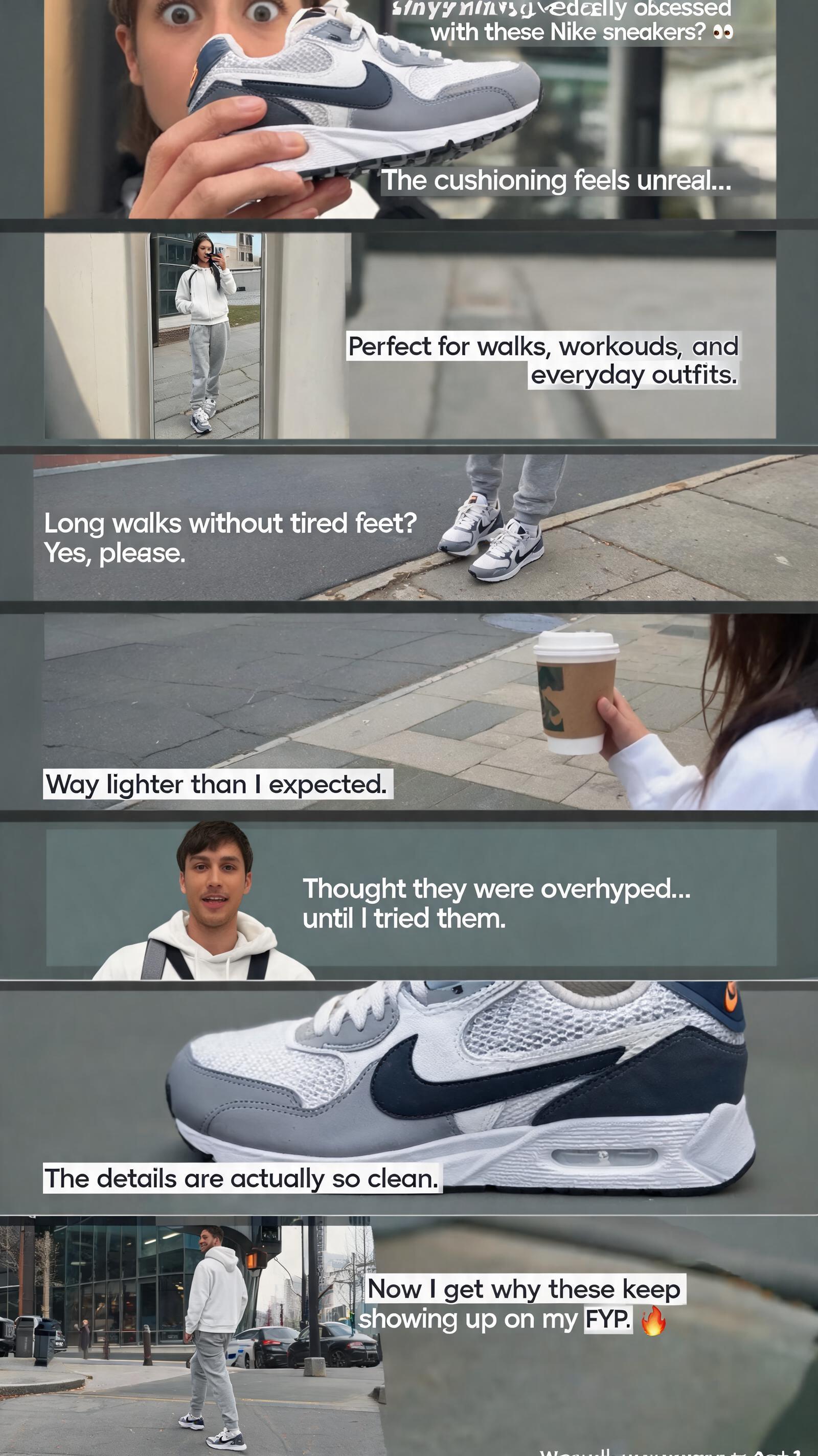
This workflow outputs 8 matched 2K storyboard frames aligned to a proven hook-to-CTA sneaker review structure for TikTok, Instagram Reels, and YouTube Shorts.

Asset
2K static storyboard frame set
Format
Model default · 2K
Model
Doubao Seedream 5.0 Lite

8 credits per image

Your references, identity direction, and approved creative context stay reusable inside the Project.

Sample generatedGenerated with · Doubao Seedream 5.0 LiteUpdated · Jul 29, 2026
2K 8-Shot Sneaker Review Short Form Storyboard Workflow generated example 1
2K · Model default
OUTPUT 01 / 02

REVIEW REQUIRED
Consistent sneaker identity across all frames · Correct shot type alignment

Generated output

Inspect the result before you put it to work.

Check the main subject, framing, material detail, and channel requirements at full size before handoff.

2K 8-Shot Sneaker Review Short Form Storyboard Workflow generated example 1
Generated result · inspect at full size before handoff

What this recipe creates

A repeatable 2k static storyboard frame set workflow.

Each frame corresponds to a specific shot type, visual beat, and pre-planned text overlay position, so you can quickly pitch, edit, or animate your sneaker product review clip without reshooting reference assets. All outputs are exploration drafts, not final production assets.

  • 8 sequential 2K storyboard frames
  • Shot type label for each individual frame
  • Mapped text overlay bounding box for each frame
  • Relatable lifestyle sneaker review visual draft
Vertical sneaker product review pre-productionSocial media content pitch decksStoryboard reference for UGC creator shoots

Required inputs

  1. Reference image of the exact sneaker model being featured
  2. Specified creator talent look and outfit reference
  3. Selected outdoor location reference for walking shots
  4. Text overlay placement guide for each frame

How it works

Review the workflow before you create.

4

Use each step as a review gate. If one gate fails, change that input before spending another generation.

01 / STEP

Generate Hook Opening Close-Up Frame

Lock your aspect ratio to 9:16 for vertical social, input your sneaker reference and talent reference, specify the extreme close-up shot of the talent bringing the sneaker toward the camera with a curious expression.

Quality check · Frame shows the sneaker entering the lower third of the frame, talent’s surprised expression is clearly visible, no distorted sneaker branding
02 / STEP

Generate POV Midsole Test Frame

Set camera perspective to first-person macro, specify a natural human hand pressing into the sneaker midsole and upper mesh to demonstrate softness.

Quality check · Pressure indent is visible on the midsole, mesh weave texture is distinct, no misprinted swoosh branding
03 / STEP

Generate Full Body Mirror Fit Check Frame

Specify a full-length bathroom or entryway mirror, talent wearing the sneaker paired with a casual sporty outfit, no distorted mirror reflections.

Quality check · Both the sneaker and full outfit are fully visible in the mirror reflection, no extra floating limbs, no reversed text artifacts
04 / STEP

Generate Final CTA Walking Closing Frame

Set camera to wide tracking shot, talent walking away from the camera smiling in an outdoor casual setting.

Quality check · Sneakers are clearly visible on the talent’s feet, movement looks natural, no distorted background elements

Recommended model and tested settings

Tested setup and quality gates.

Model
Doubao Seedream 5.0 Lite · doubao-seedream-5-0-lite-260128
Style
This model reliably outputs 2K 9:16 vertical frames for this workflow, no extra upscaling is required for pre-production use.
Resolution
2K
Guidance
This workflow does not support animated video output, only static storyboard frame generation.
Tested
Jul 29, 2026

Quality checklist

Consistent sneaker identity across all framesThe exact sneaker model, colorway, and swoosh branding matches across every one of the 8 generated frames
Correct shot type alignmentEach frame matches the specified shot perspective (extreme close-up, macro, low-angle tracking, etc.) outlined in the workflow structure
No visible anatomy errorsAll hands, feet, and limbs in every frame have correct human proportions with no extra or missing digits
Verified 2K resolution outputEvery exported frame meets the verified 2K size requirement with no upscaling artifacts
Clear text overlay negative spaceEach frame leaves empty unobstructed space in the upper or lower third for the planned text overlay, no key visual elements are covered

Common failure modes

Know what to correct before the next run.

FAILURE / 01

Sneaker swoosh logo is reversed or distorted across multiple frames

Add a high-res isolated reference of the correct swoosh logo to your input assets for every frame generation run

FAILURE / 02

Talent’s facial features change drastically between sequential frames

Use the exact same face reference image and identity lock setting for every frame in the sequence

FAILURE / 03

Mirror reflection shows distorted extra limbs or reversed text

Add a negative prompt for distorted reflections, extra limbs, and reversed text, and re-run the single frame generation

FAILURE / 04

Walking shot shows floating feet that do not make contact with the ground

Lower your motion strength setting by 0.2 points and re-generate the individual frame

FAQ

Production notes.

These outputs are pre-production exploration drafts, not final production assets. You will need to retouch any distorted branding, incorrect anatomy, or inconsistent details before publishing.

Input a high-resolution clear reference of the exact swoosh logo for every generation step, and add a negative prompt for misprinted, reversed, or distorted branding to your generation parameters.

Use a consistent face reference image for every frame generation, and lock your character identity settings to reduce cross-frame identity drift.

Yes, each frame maps directly to a 2-5 second shot slot on a 60-second or shorter vertical video timeline, with pre-mapped text overlay positions that align to standard edit pacing.