Skip to content

Generate a consistent 2K original East Asian academy girl multi-view character exploration draft

2K Modern East Asian Academy Girl Multi-View Reference Sheet

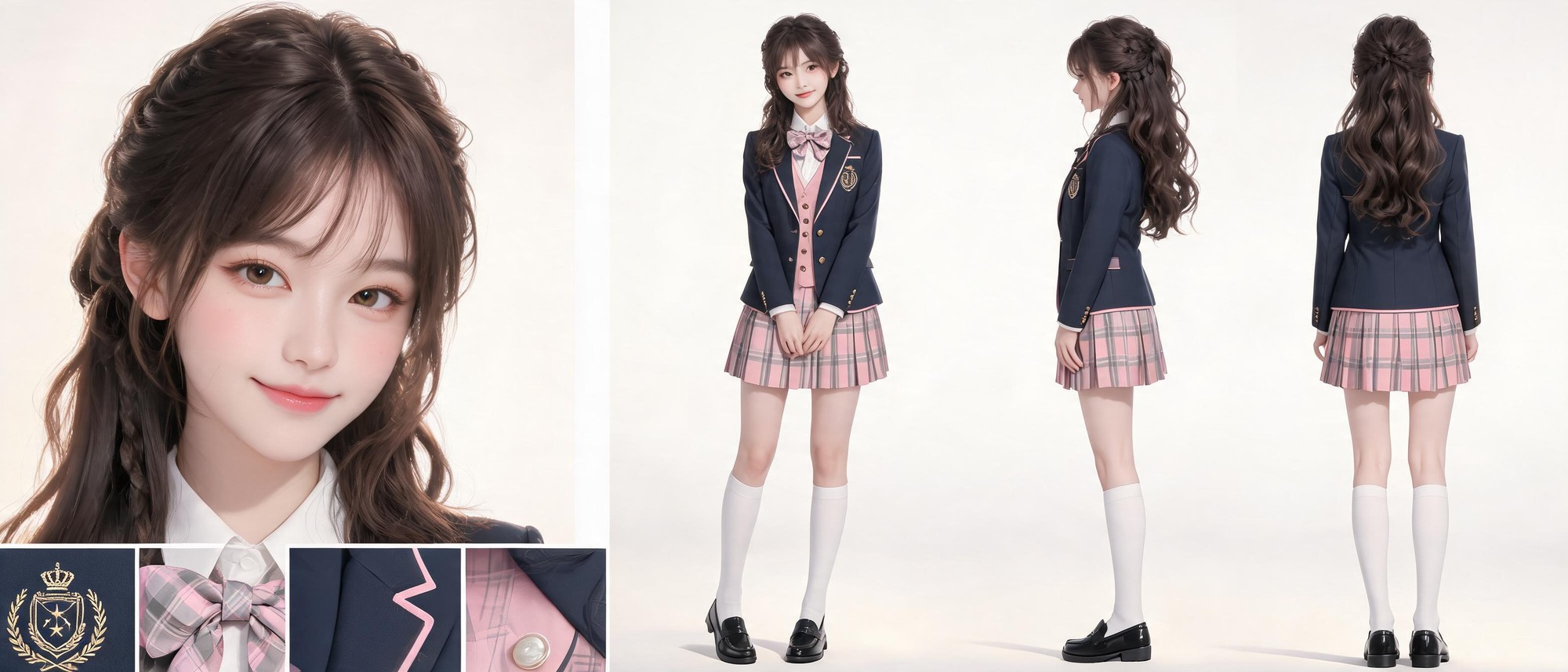
This workflow produces a 2K non-IP, non-stylized realistic character reference sheet for an 18-year-old East Asian academy girl, arranged on a clean light grey gradient background with no embedded text or watermarks.

Asset
2K multi-view character reference exploration sheet
Format
Model default · 2K
Model
Doubao Seedream 5.0 Lite

8 credits per image

Your references, identity direction, and approved creative context stay reusable inside the Project.

Sample generatedGenerated with · Doubao Seedream 5.0 LiteUpdated · Jul 29, 2026
2K Modern East Asian Academy Girl Multi-View Reference Sheet generated example 1
2K · Model default
OUTPUT 01 / 02

REVIEW REQUIRED
Consistent character identity · Clear view separation

Generated output

Inspect the result before you put it to work.

Check the main subject, framing, material detail, and channel requirements at full size before handoff.

2K Modern East Asian Academy Girl Multi-View Reference Sheet generated example 1
Generated result · inspect at full size before handoff

What this recipe creates

A repeatable 2k multi-view character reference exploration sheet workflow.

The output includes a facial closeup, full front, side, and back full body views, plus cropped uniform detail previews for all clothing and accessory elements, rendered with commercial studio lighting and natural film color grading.

  • 2K multi-view character exploration draft
  • Aligned high-resolution facial closeup view
  • Full front, side, back full body character views
  • Cropped uniform detail previews for accessories and fabric
Original academy-themed character concept explorationUniform design reference draftingNon-stylized realistic character look development

Required inputs

  1. Full 18-year-old East Asian academy girl character identity parameters
  2. 2K output resolution setting enabled
  3. No embedded text / watermark generation toggle
  4. Light grey soft gradient background parameter

How it works

Review the workflow before you create.

4

Use each step as a review gate. If one gate fails, change that input before spending another generation.

01 / STEP

Set base layout and background parameters

Input the required horizontal layout structure with 4 distinct view zones, set background to soft light grey gradient, disable all automatic text and watermark generation.

Quality check · Output has no stray text, watermarks, or background clutter, all view zones are clearly separated with no overlapping elements
02 / STEP

Lock consistent character identity across all views

Input the full 8.3 head proportion, facial feature, hair style, and body shape parameters for the 18-year-old East Asian academy girl before adding clothing details.

Quality check · Facial features, hair texture, and body proportions match across every view, no unexpected face shape or height drift
03 / STEP

Add layered uniform material details

Input separate fabric parameters for each clothing piece, assign unique reflective properties for wool, cotton, leather, and embroidered elements.

Quality check · Each fabric shows distinct texture and light response, no blurry or merged material details across the suit, shirt, skirt, and footwear
04 / STEP

Apply studio lighting and color grading

Input 3-point commercial studio lighting parameters, set color profile to match low-saturation natural film grading.

Quality check · Skin tone is natural with no over-saturation, rim light clearly defines hair and shoulder edges, no harsh overexposed highlights on any surface

Recommended model and tested settings

Tested setup and quality gates.

Model
Doubao Seedream 5.0 Lite · doubao-seedream-5-0-lite-260128
Style
This workflow is validated for 2K output only, do not enable higher resolution upscale without re-running the consistency check for all views.
Resolution
2K
Guidance
The workflow works best with no style transfer filters enabled, avoid adding extra unrelated character references to the prompt.
Tested
Jul 29, 2026

Quality checklist

Consistent character identityFacial features, hair style, body proportion, and skin tone match across all 4 main views with no unexpected drift
Clear view separationFacial closeup, full front, side, back, and uniform detail previews are all distinct, no overlapping or cropped critical elements
Distinct fabric textureEach uniform material shows unique, recognizable texture and light reflection that matches the specified fabric type
Clean uncluttered backgroundNo stray objects, watermarks, or embedded text appear anywhere on the light grey gradient background
Natural color gradingSkin tones are warm and natural, no over-saturated colors, no harsh contrast that washes out fine facial or fabric details

Common failure modes

Know what to correct before the next run.

FAILURE / 01

Different facial features appear across the closeup and full body views

Move the full character identity parameter block to the very top of your prompt before any layout or background settings

FAILURE / 02

Blurry merged fabric details on the uniform

Break each individual fabric material description into its own separate line in your prompt, no more than 2 material references per line

FAILURE / 03

Random stray text or fake characters appear on the school crest

Add an explicit 'no text, no legible characters, no fake writing' negative prompt line at the end of your prompt block

FAILURE / 04

Overexposed highlights wash out hair and shoulder edges

Reduce rim light intensity to 15% of the main diffused light brightness, no higher

FAQ

Production notes.

No, this output is an exploration draft. Generated views may have minor perspective distortion, and small details may not align perfectly across angles, so you will need to trace and correct the sheet manually for 3D production use.

No, the workflow is set to disable all embedded text generation, so any embroidered crest elements will appear as graphic shapes with no legible text, no false orthography will be added to the design.

Yes, you can adjust the hair color, uniform accent color, and facial feature parameters to create new unique characters, but you will need to re-run the consistency check to avoid identity drift across views.

The verified tested output resolution is 2K, higher resolution outputs are not validated for consistent alignment across all views.