Skip to content

Generate a polished exploration draft of a minimalist editorial portrait poster for talent promotion or editorial feature use

2K Minimalist Editorial Portrait Poster Workflow

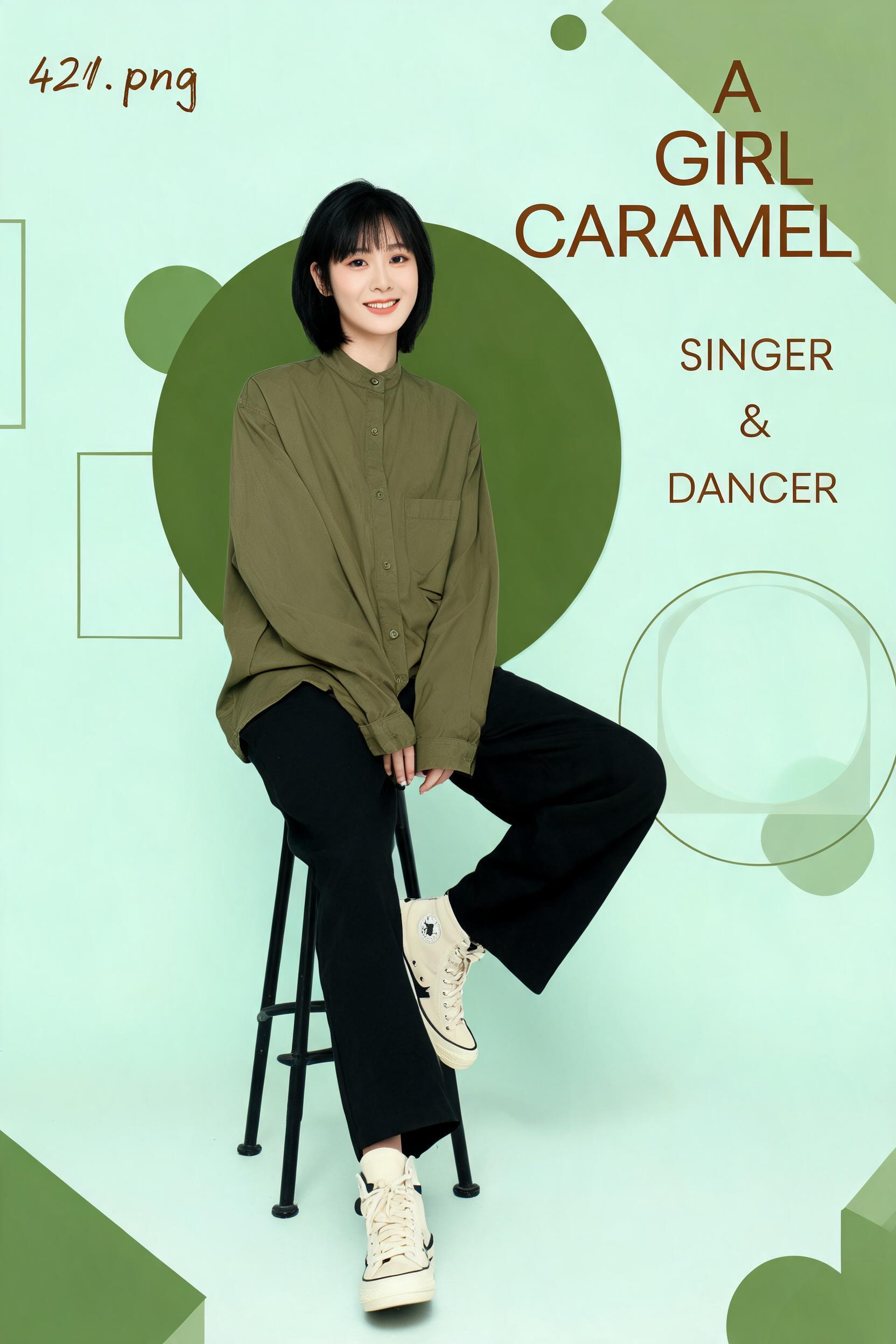
This workflow outputs a 2K resolution exploration draft of a balanced minimalist editorial portrait poster, intended for talent promotion, personal branding, or small editorial feature use.

Asset
2K resolution editorial portrait poster draft
Format
Model default · 2K
Model
Doubao Seedream 5.0 Lite

8 credits per image

Your references, identity direction, and approved creative context stay reusable inside the Project.

Sample generatedGenerated with · Doubao Seedream 5.0 LiteUpdated · Jul 29, 2026
2K Minimalist Editorial Portrait Poster Workflow generated example 1
2K · Model default
OUTPUT 01 / 02

REVIEW REQUIRED
2K verified resolution · Balanced negative space

Generated output

Inspect the result before you put it to work.

Check the main subject, framing, material detail, and channel requirements at full size before handoff.

2K Minimalist Editorial Portrait Poster Workflow generated example 1
Generated result · inspect at full size before handoff

What this recipe creates

A repeatable 2k resolution editorial portrait poster draft workflow.

The workflow generates a full-body portrait of a casually dressed talent paired with muted geometric graphic elements and vertical typography on a soft pastel mint background, producing a ready-to-refine draft at verified 2K resolution.

  • 2K resolution exploration draft portrait poster
  • Full-body subject portrait with soft diffused studio lighting
  • Balanced layout of muted olive geometric graphic elements
  • Integrated vertical typography on the poster canvas
Talent promotional poster draftsIndependent magazine feature layoutsPersonal brand social media assets

Required inputs

  1. Reference of the subject's desired casual outfit (olive stand collar shirt, black wide leg pants, cream high tops)
  2. Exact typography text strings for title, subtitle, and corner filename
  3. Preferred muted earthy tone palette reference
  4. 2K output resolution setting enabled

How it works

Review the workflow before you create.

4

Use each step as a review gate. If one gate fails, change that input before spending another generation.

01 / STEP

Lock in subject portrait proportions first

Set your aspect ratio to match 2K portrait dimensions, input the full subject description including outfit, haircut, and relaxed seated pose, disable extra decorative elements for the first generation pass.

Quality check · Output shows a full-body seated subject with no distorted limbs, eye level 50mm perspective, and natural relaxed expression.
02 / STEP

Add background geometric elements in a second generation pass

Use the first approved portrait as an image reference, add prompts for pastel mint matte background, muted olive circle and line geometric shapes, and balanced negative space.

Quality check · Geometric elements do not overlap the subject's face, layout remains spacious with no cluttered overlapping shapes.
03 / STEP

Insert typography elements with targeted generation prompts

Use the approved graphic layout as reference, specify exact vertical text placement on the right edge of the canvas, and small handwritten filename in the upper left corner.

Quality check · Typography is positioned in the specified zones, no extra random text appears outside the requested locations.
04 / STEP

Adjust lighting and color grading for final draft

Input prompts for soft diffused studio lighting, subtle soft shadow under the stool, and muted earthy color palette alignment.

Quality check · No harsh highlights appear on skin or clothing, all tones match the requested pastel mint and olive palette range.

Recommended model and tested settings

Tested setup and quality gates.

Model
Doubao Seedream 5.0 Lite · doubao-seedream-5-0-lite-260128
Style
This model reliably outputs 2K resolution portrait drafts for this workflow, no extra custom fine-tuning is required for base generation passes.
Resolution
2K
Guidance
Works with standard image generation interfaces that support image reference input for multi-pass workflow steps.
Tested
Jul 29, 2026

Quality checklist

2K verified resolutionOutput file meets exact 2K dimension specifications with no upscaled artifacts.
Balanced negative spaceAt least 40% of the canvas is empty uncluttered space, no overcrowded graphic elements.
Consistent soft lightingNo harsh shadows or blown-out highlights, skin tones are smooth and evenly illuminated.
Correct color palette alignmentAll background and graphic elements fall within the requested pastel mint, muted olive, and warm brown tone range.
Natural subject anatomyNo distorted limbs, extra fingers, or misproportioned body parts on the seated subject.

Common failure modes

Know what to correct before the next run.

FAILURE / 01

Subject's legs or hands appear distorted or merged with the stool

Add explicit prompts for separate, clearly defined stool legs and crossed leg positioning, reduce generation step count by 2.

FAILURE / 02

Typography has garbled false orthography that does not match the requested text

Delete all generated text layers and replace them with manually typed vector text in a separate graphic editor.

FAILURE / 03

Geometric elements are overly saturated and clash with the muted palette

Add a prompt for 30% desaturation on all olive green geometric elements, reduce CFG scale by 1.

FAILURE / 04

Subject is positioned too close to the edge of the canvas

Add explicit prompt that the subject sits 15% right of the exact canvas center, add 10% extra negative space to the left side of the frame.

FAQ

Production notes.

Text generation in image outputs is inherently unreliable for precise typography. You will need to replace any generated text with manually set vector typography in a design tool for final production use.

No, the verified 2K resolution is only suitable for small print sizes up to A4, social media feeds, and digital editorial use. Upscaling beyond that will result in visible pixelation.

Lock the first approved subject portrait as an image reference with a 0.7-0.8 reference weight to preserve pose and facial features across subsequent generation passes.

The generation engine does not automatically prioritize subject focal point over graphic elements. Add explicit prompts that state all graphic elements must sit behind the subject to reduce overlap.