Skip to content

Generate realistic intimate late-night direct flash portraits for social media and fashion concept exploration

2K Late Night Direct Flash Social Portrait Workflow

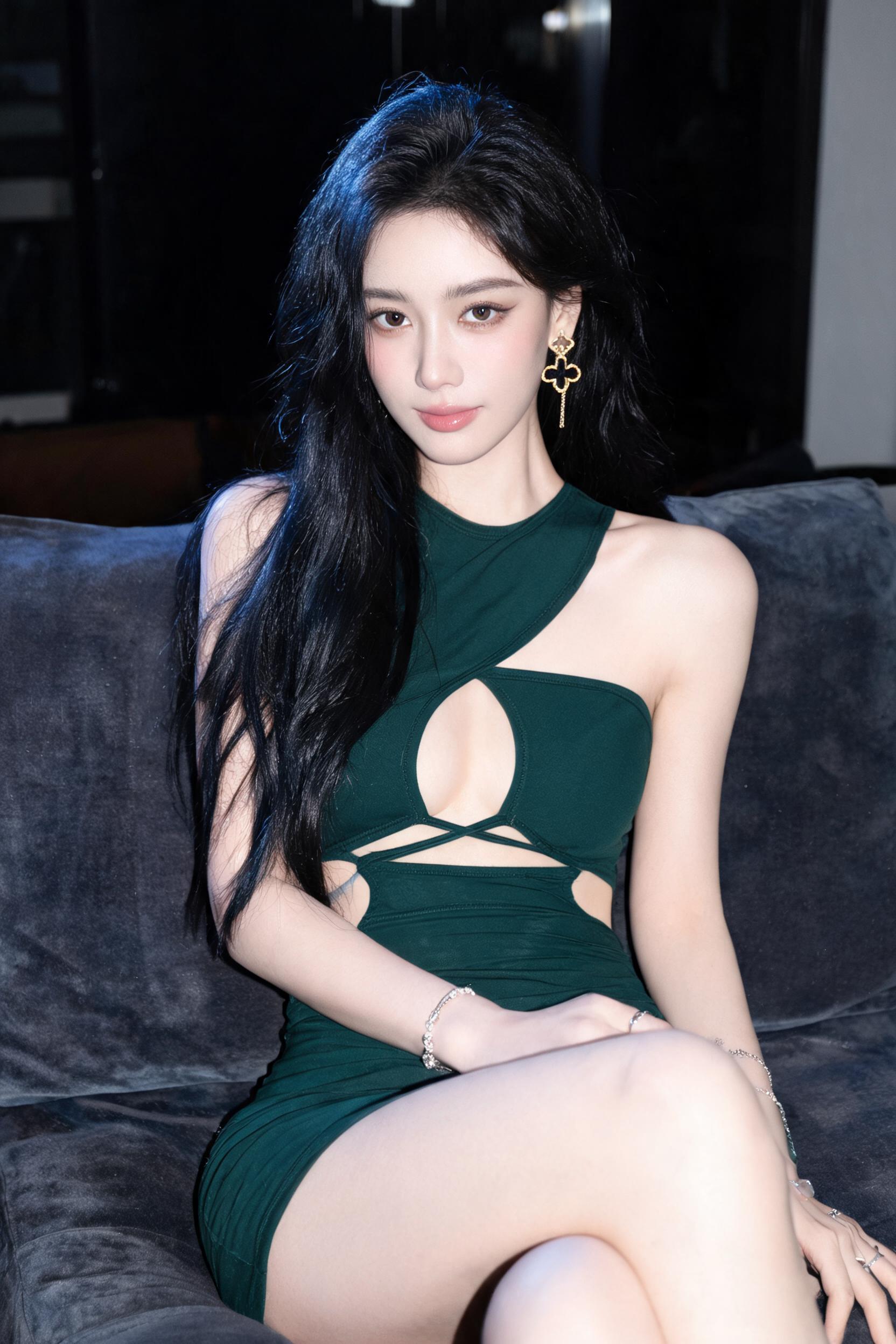
This workflow produces 2K resolution 3:4 vertical photorealistic portraits of a seated styled subject in a dim luxury lounge, with authentic direct flash lighting, natural skin texture, and unpolished spontaneous social media photo feel.

Asset
2K vertical 3:4 photorealistic portrait image
Format
Model default · 2K
Model
Doubao Seedream 5.0 Lite

8 credits per image

Your references, identity direction, and approved creative context stay reusable inside the Project.

Sample generatedGenerated with · Doubao Seedream 5.0 LiteUpdated · Jul 29, 2026
2K Late Night Direct Flash Social Portrait Workflow generated example 1
2K · Model default
OUTPUT 01 / 02

REVIEW REQUIRED
Correct 2K 3:4 aspect ratio · Authentic direct flash lighting

Generated output

Inspect the result before you put it to work.

Check the main subject, framing, material detail, and channel requirements at full size before handoff.

2K Late Night Direct Flash Social Portrait Workflow generated example 1
Generated result · inspect at full size before handoff

What this recipe creates

A repeatable 2k vertical 3:4 photorealistic portrait image workflow.

This workflow is built for creative professionals looking to generate realistic, non-overproduced late-night portraits that read as candid shots taken mid-event pause, not overproduced commercial assets. It adheres to specific makeup, garment, lighting, and composition rules to avoid common AI generation artifacts like distorted anatomy or over-smoothed plastic skin.

  • 2K 3:4 vertical photorealistic portrait file
  • Natural direct flash highlight and shadow distribution
  • Realistic fabric texture for velvet sofa and stretch jersey dress
  • Subtle digital shadow noise matching compact camera output
Vertical social media feed contentFashion makeup reference assetsCasual portrait concept exploration

Required inputs

  1. Core subject pose and framing reference notes
  2. Specified makeup and styling parameters
  3. Garment design detail list
  4. Lighting rule set (direct on-camera flash only)

How it works

Review the workflow before you create.

4

Use each step as a review gate. If one gate fails, change that input before spending another generation.

01 / STEP

Lock in core subject pose and framing first

Start by defining the seated position, camera height, and 3:4 crop before adding styling details. Confirm the subject is centered with the heavy hair fall on the left and extended foreground knee on the lower right to create the intended mild compositional imbalance.

Quality check · No extreme cropping cuts off the top of the head or the foreground knee, perspective matches 28-35mm full frame equivalent
02 / STEP

Apply makeup and hair styling constraints

Input the exact Korean idol inspired makeup rules, cool blue-black long wavy hair parameters, and stray hair requirements, explicitly ban perfectly uniform hair styling.

Quality check · No overdrawn exaggerated eyeliner, no fully slicked back uniform hair, at least 2-3 stray strands are visible near the arms
03 / STEP

Render garment and accessory details correctly

Specify the asymmetric halter bodycon dress geometry, fabric type, and allowed single earring + bracelet set, explicitly ban necklaces, second visible earrings, and extra props.

Quality check · All cutouts, crossed straps, and diagonal front panel are present, no extra unlisted props appear in frame
04 / STEP

Calibrate direct flash lighting and background exposure

Input the on-camera close flash rule, ban softboxes and rim lighting, set background to underexpose rapidly with only faint cool blue-violet edge glow.

Quality check · No soft diffused shadows, highlights are concentrated on high points of the face and body, background sofa details are visible but underexposed

Recommended model and tested settings

Tested setup and quality gates.

Model
Doubao Seedream 5.0 Lite · doubao-seedream-5-0-lite-260128
Style
This workflow is tested to output verified 2K resolution files when run on the specified model. All outputs are exploration drafts that may require minor post-production touch-ups.
Resolution
2K
Guidance
Adjust prompt weighting for garment and lighting details if you run this workflow on other untested image generation models.
Tested
Jul 29, 2026

Quality checklist

Correct 2K 3:4 aspect ratioFinal output is exactly 2K resolution, cropped to vertical 3:4 framing from top of the subject's head down to the knees and a small section of lower legs
Authentic direct flash lightingHighlights are concentrated on facial and body high points, shadows are short and defined, light falls off rapidly to leave the background underexposed with no softbox or rim lighting present
Accurate garment geometryThe asymmetric halter dress retains all specified cutouts, crossed straps, and panel placement, with natural fabric wrinkles from the seated pose and no latex-like sheen
Natural non-plastic skin textureSkin retains faint pores, subtle tonal variation, and minor natural irregularities, no over-blurred waxy porcelain finish
Candid unpolished moodMinor digital noise is present in shadows, framing is slightly imperfect, no overly sharp commercial ad polish that breaks the spontaneous captured moment feel

Common failure modes

Know what to correct before the next run.

FAILURE / 01

Subject anatomy is distorted, with unnaturally elongated limbs or impossible body proportions

Add an explicit note to cap foreground perspective distortion at a natural 28-35mm lens level, no extreme wide-angle warping

FAILURE / 02

Multiple extra unlisted earrings, necklaces, or props appear in the scene

Add all banned items to your negative prompt list, and re-run generation with no extra unvetted scene keywords

FAILURE / 03

Skin appears completely over-smoothed, with zero visible texture and a waxy plastic finish

Lower the beauty filter strength parameter, and add explicit prompts to retain faint pores, minor skin marks, and natural tonal variation

FAILURE / 04

Lighting is soft and diffused, with no harsh direct flash highlights on the subject

Explicitly add 'no softbox, no fill light, direct harsh on-camera flash, hard short shadows' to the positive prompt to override default lighting behavior

FAQ

Production notes.

All generated outputs are concept exploration assets, not verified production shots. They may contain minor anatomy inconsistencies or detail errors that require post-production touch-up before public use.

You must first confirm that your usage terms align with the model provider's license agreement, and secure any required model releases for commercial client work before deployment.

Add explicit text prompts to retain faint pores, subtle tonal variation, and minor natural skin marks, and reduce any built-in beauty filter strength setting in your generation tool.

The generation model may default to common lounge scene props. Add an explicit negative prompt listing all banned props to eliminate these unwanted elements from the output.