Skip to content

Generate a cohesive 4-piece set of experimental vertical editorial portrait posters

2K 4-Piece Experimental Glitch Editorial Portrait Poster Set

All outputs from this workflow are exploration drafts, not final production assets, and require post-processing to fix text, minor anatomy inconsistencies, and refine distortion placement.

Asset
2K 9:16 experimental editorial portrait poster series
Format
Model default · 2K
Model
Doubao Seedream 5.0 Lite

8 credits per image

Your references, identity direction, and approved creative context stay reusable inside the Project.

Sample generatedGenerated with · Doubao Seedream 5.0 LiteUpdated · Jul 29, 2026
2K 4-Piece Experimental Glitch Editorial Portrait Poster Set generated example 1
2K · Model default
OUTPUT 01 / 02

REVIEW REQUIRED
Consistent 9:16 2K resolution · Partial facial recognizability

Generated output

Inspect the result before you put it to work.

Check the main subject, framing, material detail, and channel requirements at full size before handoff.

2K 4-Piece Experimental Glitch Editorial Portrait Poster Set generated example 1
Generated result · inspect at full size before handoff

What this recipe creates

A repeatable 2k 9:16 experimental editorial portrait poster series workflow.

The workflow produces four distinct themed portraits, each with a unique limited color palette, targeted distortion style, and matching short editorial text treatment, formatted to verified 2K resolution for vertical editorial use.

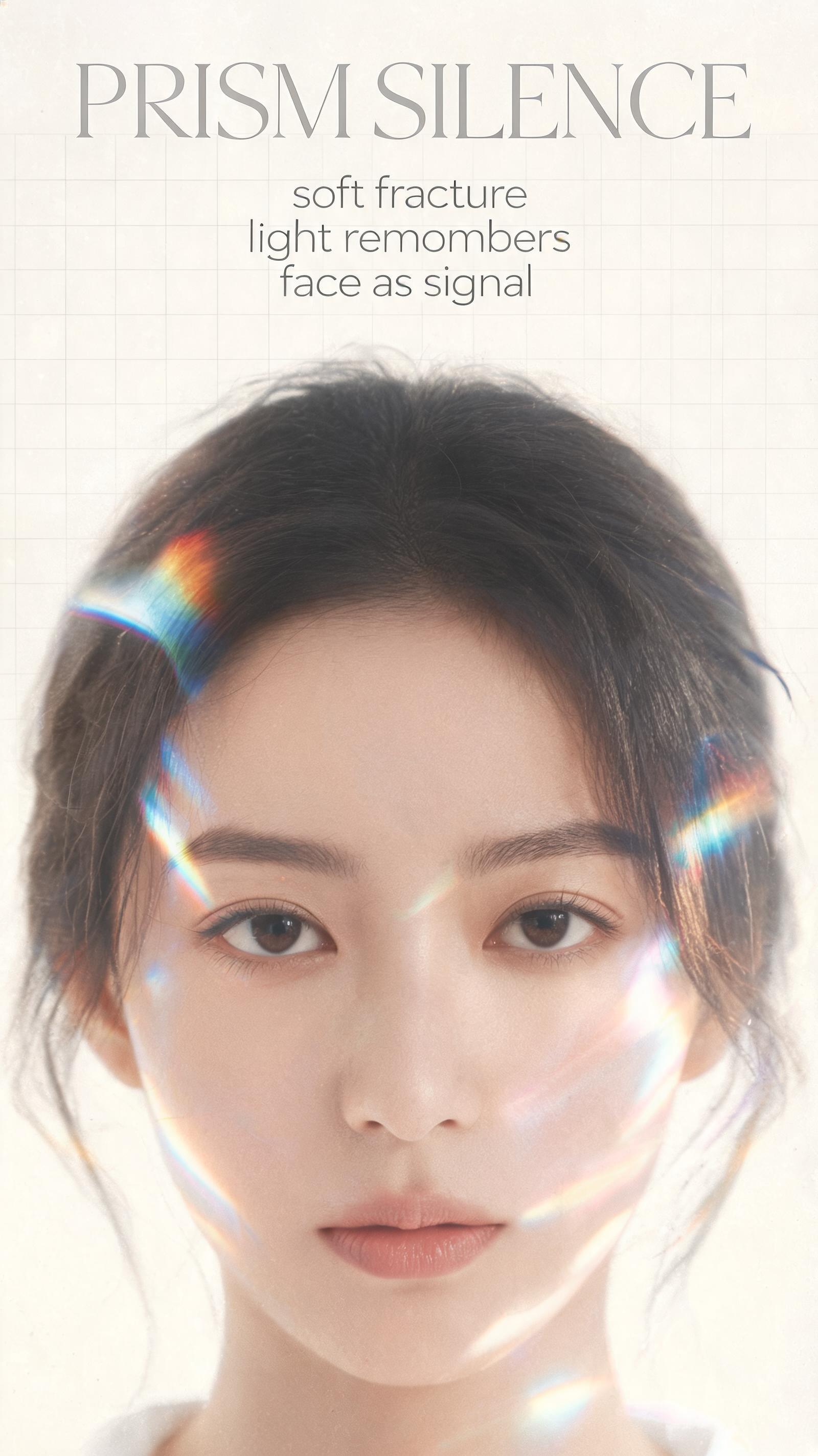
  • PRISM SILENCE themed refraction portrait draft
  • BLUE RESIDUE themed scan glitch portrait draft
  • ECHO FRAME themed chromatic displacement portrait draft
  • SIGNAL ASH themed digital ash erosion portrait draft
  • Cohesive 4-piece series asset pack
Vertical editorial poster designSocial media brand campaign assetsLimited edition zine spreads

Required inputs

  1. Selected portrait theme reference
  2. Base subject demographic parameters
  3. Pre-locked limited color palette for each portrait
  4. Typography placement guide

How it works

Review the workflow before you create.

4

Use each step as a review gate. If one gate fails, change that input before spending another generation.

01 / STEP

Generate PRISM SILENCE Refraction Portrait

Set canvas aspect ratio to 9:16, lock resolution to 2K, input the deep ivory and muted silver base palette, specify a forward-facing adult female subject, add parameters for soft prism refraction around the face, faint transparent grid overlay, and minimal centered text placement.

Quality check · Confirm eyes and nose stay sharp, facial features remain partially recognizable, no over-saturated color bleed outside the face perimeter
02 / STEP

Generate BLUE RESIDUE Scan Glitch Portrait

Lock 9:16 2K resolution, set base palette to dark navy, black, and electric cobalt, specify a three-quarter profile adult male with thin metallic sunglasses, add parameters for cold blue light beam across the face, partial motion blur on the neck, subtle horizontal scan lines.

Quality check · Verify the light beam cuts cleanly across facial features, scan lines do not obscure the subject's core silhouette, no distorted extra limbs appear
03 / STEP

Generate ECHO FRAME Chromatic Glitch Portrait

Set solid bright white background, lock 9:16 2K resolution, specify a side profile East Asian adult woman, add parameters for soft chromatic aberration trails in cyan, violet, acid green, and red, thin layout lines and micro-text accents.

Quality check · Confirm chromatic trails extend no more than 10% of the frame width, side profile anatomy stays consistent, no unreadable random text appears in the micro-text areas
04 / STEP

Generate SIGNAL ASH Digital Erosion Portrait

Lock 9:16 2K resolution, set base palette to monochrome charcoal, pale gray, and washed lavender, specify a forward-facing shaved-head adult male, add parameters for digital ash distortion on the lower half of the face, fine film grain, faint subtle grid overlay.

Quality check · Verify upper half of the face stays sharp and recognizable, erosion effect only applies below the mouth line, no random floating artifacts appear in empty background space

Recommended model and tested settings

Tested setup and quality gates.

Model
Doubao Seedream 5.0 Lite · doubao-seedream-5-0-lite-260128
Style
This workflow is tested exclusively for the listed model, do not port prompts to other image generation models without adjusting distortion weight parameters.
Resolution
2K
Guidance
The 2K 9:16 output size is verified for this model, larger resolution outputs are not guaranteed to render correctly.
Tested
Jul 29, 2026

Quality checklist

Consistent 9:16 2K resolutionAll outputs match the verified 2K vertical resolution with no stretched or cropped distorted edges
Partial facial recognizabilityCore facial features (eyes, nose, primary silhouette) stay identifiable, no full facial erasure from distortion effects
Themed color palette adherenceEach portrait strictly uses its assigned limited color palette, no unplanned out-of-gamut colors appear
Clean minimal composition60% or more of the frame is empty negative space, no cluttered overlapping elements that break the spacious layout
Targeted distortion placementDistortion effects only appear in pre-defined areas around the face, no effects spread to the full frame unnecessarily

Common failure modes

Know what to correct before the next run.

FAILURE / 01

Full face is completely distorted and unrecognizable

Reduce the distortion effect weight by 30%, add explicit text prompting to keep eyes and nose sharp

FAILURE / 02

Generated editorial text is misspelled or garbled

Remove text generation parameters from the prompt, add your desired typography later in a separate graphic editing tool

FAILURE / 03

Distortion effects spread across the entire background

Add a line to the prompt that restricts all refraction, glitch, and blur effects to the subject's face and immediate surrounding 10% perimeter

FAILURE / 04

Portrait anatomy has distorted ear shapes or extra small features

Add a simple line prompting for correct human anatomy, no extra limbs or distorted facial features, and re-run the generation

FAQ

Production notes.

All outputs are 2K resolution exploration drafts, you will need to retouch typography, fix minor anatomy inconsistencies, and export to a higher resolution if you are printing at sizes larger than A3.

Lock a consistent base subject reference for each portrait before adding distortion parameters, and limit the distortion effect to only pre-defined sections of the face and frame.

The generated text is often partially fractured or misspelled, you will need to replace all editorial text in a separate graphic editor to get fully legible, correctly formatted typography.

Overweighting distortion parameters will spread effects to unintended areas of the frame, reduce the distortion weight by 20% if you see unwanted artifacts in the empty negative space.