Skip to content

Generate a structured multi-panel character reference exploration draft for early game concept ideation

2K Multi-Panel Game Character Reference Sheet Workflow

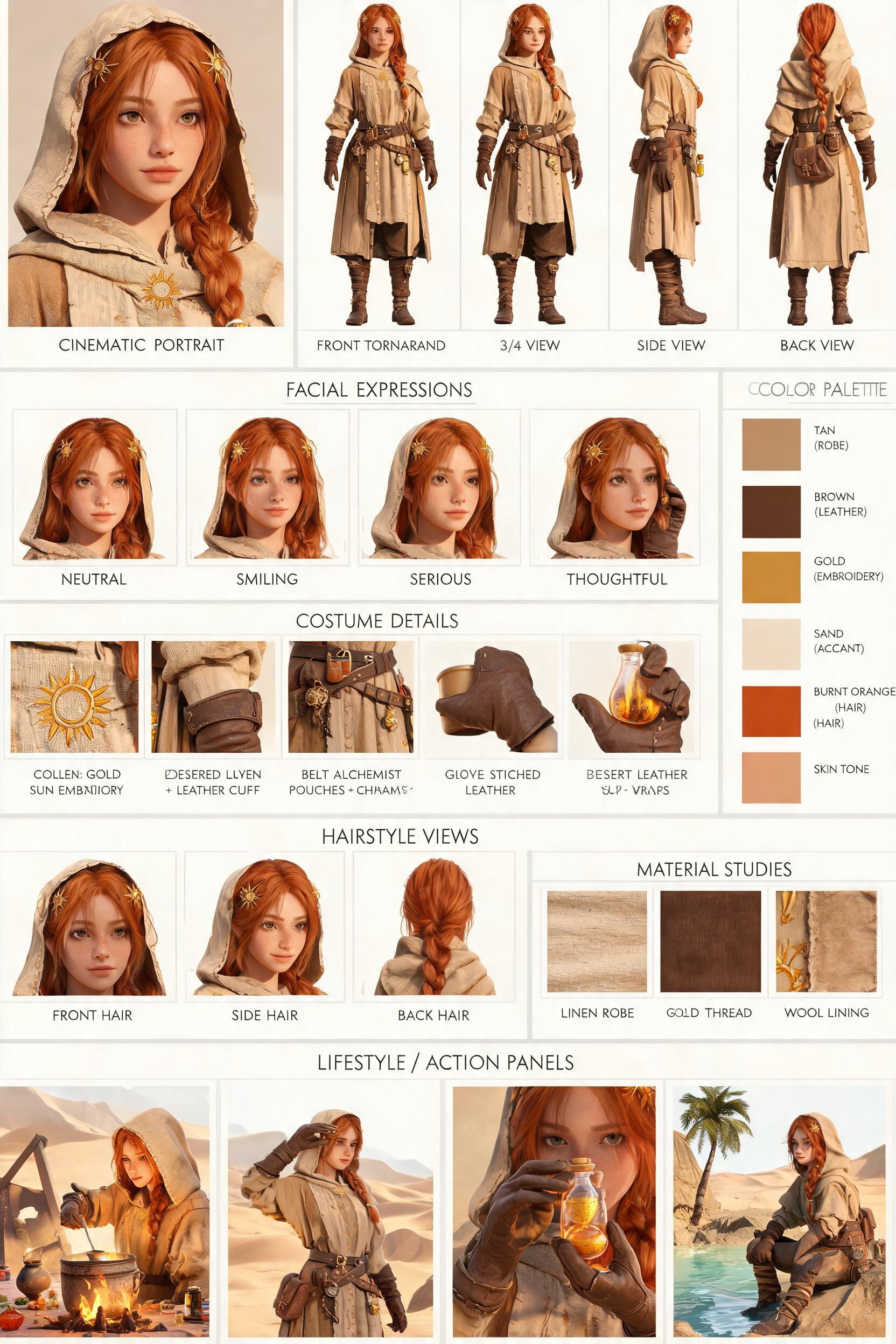
This workflow outputs a 2K exploration draft character reference sheet with a structured editorial layout, supporting 3 distinct character themes: cyberpunk neon operative, ancient Chinese hanfu scholar, fantasy desert alchemist.

Asset
2K character design reference sheet
Format
Model default · 2K
Model
Doubao Seedream 5.0 Lite

8 credits per image

Your references, identity direction, and approved creative context stay reusable inside the Project.

Sample generatedGenerated with · Doubao Seedream 5.0 LiteUpdated · Jul 29, 2026
2K Multi-Panel Game Character Reference Sheet Workflow generated example 1
2K · Model default
OUTPUT 01 / 02

REVIEW REQUIRED
Layout structure adherence · Panel completeness

Generated output

Inspect the result before you put it to work.

Check the main subject, framing, material detail, and channel requirements at full size before handoff.

2K Multi-Panel Game Character Reference Sheet Workflow generated example 1
Generated result · inspect at full size before handoff

What this recipe creates

A repeatable 2k character design reference sheet workflow.

This workflow produces a structured reference board with a large cinematic portrait, 4 full-body turnaround views, 4 facial expression studies, costume detail callouts, hairstyle angle previews, material swatches, a vertical color palette, and small bottom action panels, all arranged on a clean cream background with subtle dividing lines and minimal labels. All outputs are exploration drafts, not production-grade technical specifications.

  • Single 2K resolution structured reference sheet image
  • Cinematic large character portrait
  • 4 full-body turnaround previews
  • Facial expression study set
  • Costume and accessory detail callouts
  • Small in-world action preview panels
Early concept character ideationMood board reference for 3D modelingTheme variant exploration for new game IP

Required inputs

  1. Selected character theme (cyberpunk operative / hanfu scholar / desert alchemist)
  2. Core character age and silhouette notes
  3. 1-2 key defining costume details to prioritize
  4. Preferred color palette base tone

How it works

Review the workflow before you create.

4

Use each step as a review gate. If one gate fails, change that input before spending another generation.

01 / STEP

Select your base character theme and lock core identity notes

Pick one of the 3 supported themes first, then add 1-2 non-negotiable character traits to avoid random design drift across panels.

Quality check · All panels show the same broad character silhouette and core theme aesthetic, no mismatched design elements appear in any section.
02 / STEP

Prioritize 3 high-priority costume details for callouts

List the specific costume parts you want to appear in the detail closeup section, to ensure the layout allocates space for those elements instead of random accessories.

Quality check · All 3 specified details appear as distinct closeup panels on the final sheet, no unrequested elements take up the detail section space.
03 / STEP

Adjust layout density for readability

Specify if you want larger action panels at the bottom or more detail callout slots, to tweak the default grid layout to match your project needs.

Quality check · The allocated space for your requested priority section is at least 20% larger than the default layout allocation.
04 / STEP

Generate 2 consecutive draft variants to compare identity consistency

Run the workflow twice with identical input settings to compare how consistent facial features and costume details are across both outputs.

Quality check · At least 70% of core character design elements match across both draft outputs.

Recommended model and tested settings

Tested setup and quality gates.

Model
Doubao Seedream 5.0 Lite · doubao-seedream-5-0-lite-260128
Style
This workflow is tested to output the verified 2K resolution size, no higher resolution outputs are confirmed to render correctly.
Resolution
2K
Guidance
Works best with single-theme inputs, multi-theme requests in one generation will produce inconsistent layout and design results.
Tested
Jul 29, 2026

Quality checklist

Layout structure adherenceOutput uses a clean cream off-white background, thin subtle dividing lines, and organized grid arrangement with no overlapping panels.
Panel completenessAll requested core sections (portrait, 4 turnarounds, expression studies, detail callouts, color palette, bottom action panels) are present on the 2K canvas.
Theme consistencyAll panels match the selected theme aesthetic, no conflicting design elements from the other 2 unused themes appear anywhere on the sheet.
Label readabilityAll subtle text labels are legible enough to identify panel content, no garbled or false orthography appears in large text blocks.
2K resolution complianceFinal output renders at the verified 2K size, no upscaling artifacts or cropped panel edges are visible.

Common failure modes

Know what to correct before the next run.

FAILURE / 01

Facial features do not match across portrait and turnaround panels

Add 1 specific distinct facial feature (e.g. small scar on left cheek) to your input notes to anchor consistent face generation across all panels.

FAILURE / 02

Multiple panels show overlapping content or cut off edges

Reduce the number of requested custom detail callouts by 2 to free up canvas space for all panels to render fully.

FAILURE / 03

Random unrelated props appear in the turnaround views

Explicitly list all props that should appear with the character in your input notes, and name 2 items that should not be included.

FAILURE / 04

Generated text labels are completely garbled and unreadable

Remove all text label requirements from your input prompt, and add labels manually in a separate image editing tool after you export the 2K draft.

FAQ

Production notes.

No, all outputs are exploration drafts. The turnaround views are approximate previews, not calibrated orthographic blueprints, and may have minor proportion shifts between panels.

No, the workflow only supports one theme per 2K output sheet to avoid layout crowding and reduce cross-theme design drift across panels.

Generated multi-panel character sheets are prone to minor identity drift, which is a common limitation of current image generation tools for this type of layout.

Yes, as long as you verify your platform's usage rights for the generated assets before sharing them publicly with external stakeholders.